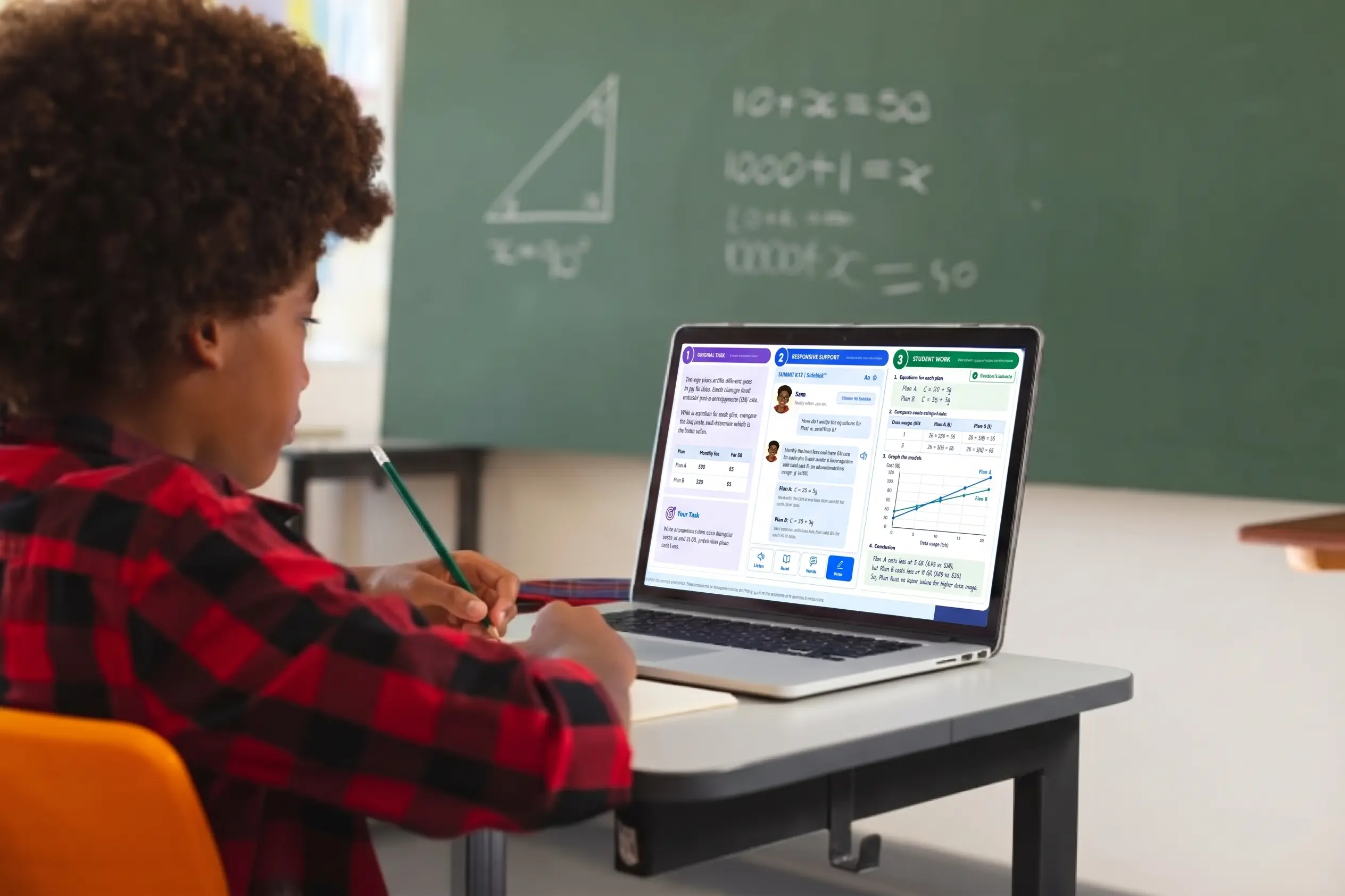






Summit Sidekick™ – Browser extension for Chrome, Edge and Safari

Enhance Grade-level Access with Sidekick

Summit Sidekick is a browser extension for Chrome, Edge and Safari that turns every lesson into a chance to build grade-level understanding and English language proficiency. Sidekick matches support to each learner's profile and adapts to the task at hand, so students can access rigorous, grade-level work and receive the support they need to succeed and grow.

Designed for Grades 3–12

Same Task. Same Rigor.
A Clearer Pathway for Every Learner.

PLACEHOLDER: Sidekick character Leo
PLACEHOLDER: Sidekick character Margo
PLACEHOLDER: Sidekick character Sam
PLACEHOLDER: Sidekick character Amina
PLACEHOLDER: Sidekick character 5
PLACEHOLDER: Sidekick character 6

Built into real instruction

Sidekick sits in your browser, bringing responsive language support into the lessons, assignments, and online resources students are using in class.

Support that adjusts dynamically

From lighter prompts to stronger scaffolds, Sidekick adapts across five instructional support levels based on the task and the learner's needs.

Full visibility and control for teachers

Teachers and districts can manage permissions, accommodations, reporting, and access so support stays aligned to goals and local policy.

From understanding the task to the right support

Summit Sidekick logo

Sidekick works alongside the lessons you already use, providing just-in-time support and capturing valuable student data. Without the need for adapted curriculum, teachers can see not just what students learned, but how they accessed the learning.

Learn More

Analyze the task

Sidekick analyzes each lesson to identify the content goal, the source and genre, and provides the language and supports that students needs.

Understand the learner

The system connects with Connect to Literacy™️ (C2L) to seamlessly align supports with language proficiency results by domain, student work, home language and access needs.
Manual settings and adjustments can also be made.

Provide responsive support

Summit Sidekick chooses the right scaffolds to help students understand the task, build vocabulary in context, do the thinking, and craft a clear response.

Review responses

As students complete tasks, Sidekick checks each response against the corresponding rubric. That new evidence shapes the next step: optional help increases, changes or fades, while required IEP and 504 supports always stay in place.

Feed evidence back to teachers

Sidekick records the supports used and the work students produce, so teachers can see the learning and plan next steps.

Supports that Fade as Learners Grow

Responsive Language Support adjusts to each learner's proficiency level. Where both systems are used, Sidekick pulls in data from Connect to Literacy to determine the level of support needed for every student. Support moves across five levels, from Modeled Access to Independent Application, and increases or fades as proficiency evidence changes.

Five instructional support levels, from stronger to lighter support: 1 Modeled Access, 2 Structured Access, 3 Guided Access, 4 Strategic Support, 5 Independent Application

Sidekick Follows Students into Every Lesson

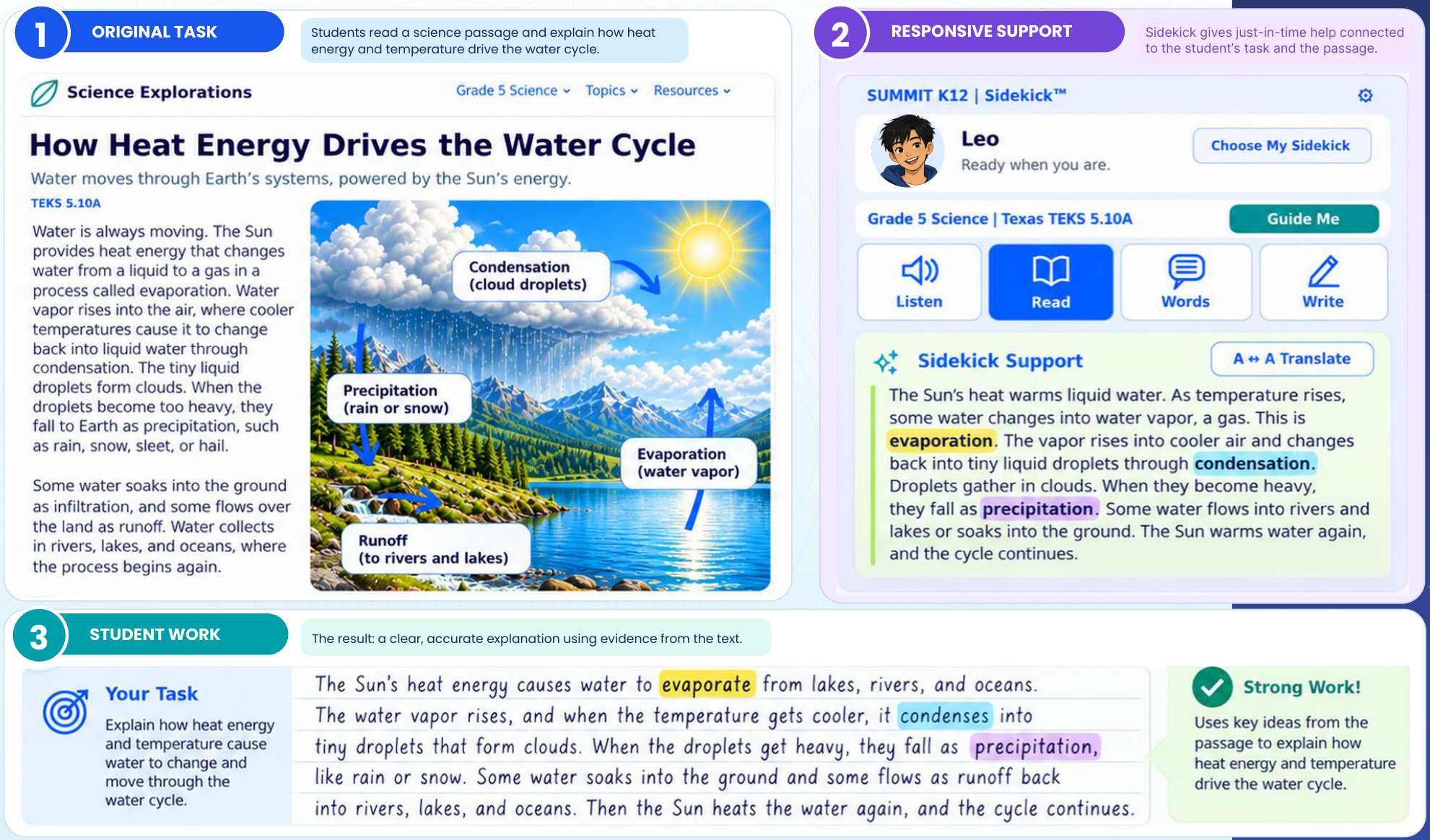
5th grade students explain the water cycle in Science

Grade 5 science example: the original water cycle passage, Leo's Sidekick support panel with highlighted vocabulary, and the student's written explanation
Leo, a Sidekick character

Sidekick provides the supports students need to explore and explain.

The task: Students read “How Heat Energy Drives the Water Cycle,” a grade 5 passage aligned to TEKS 5.10A, and explain how heat energy and temperature move water through the cycle.

The support: Sidekick offers an amplified reading of the same passage. Students can listen, explore key words, translate or get help structuring their response.
All of the supports they need appear alongside the lesson.

The result: The student writes a clear, accurate explanation, builds vocabulary in context, and stetches their writing.

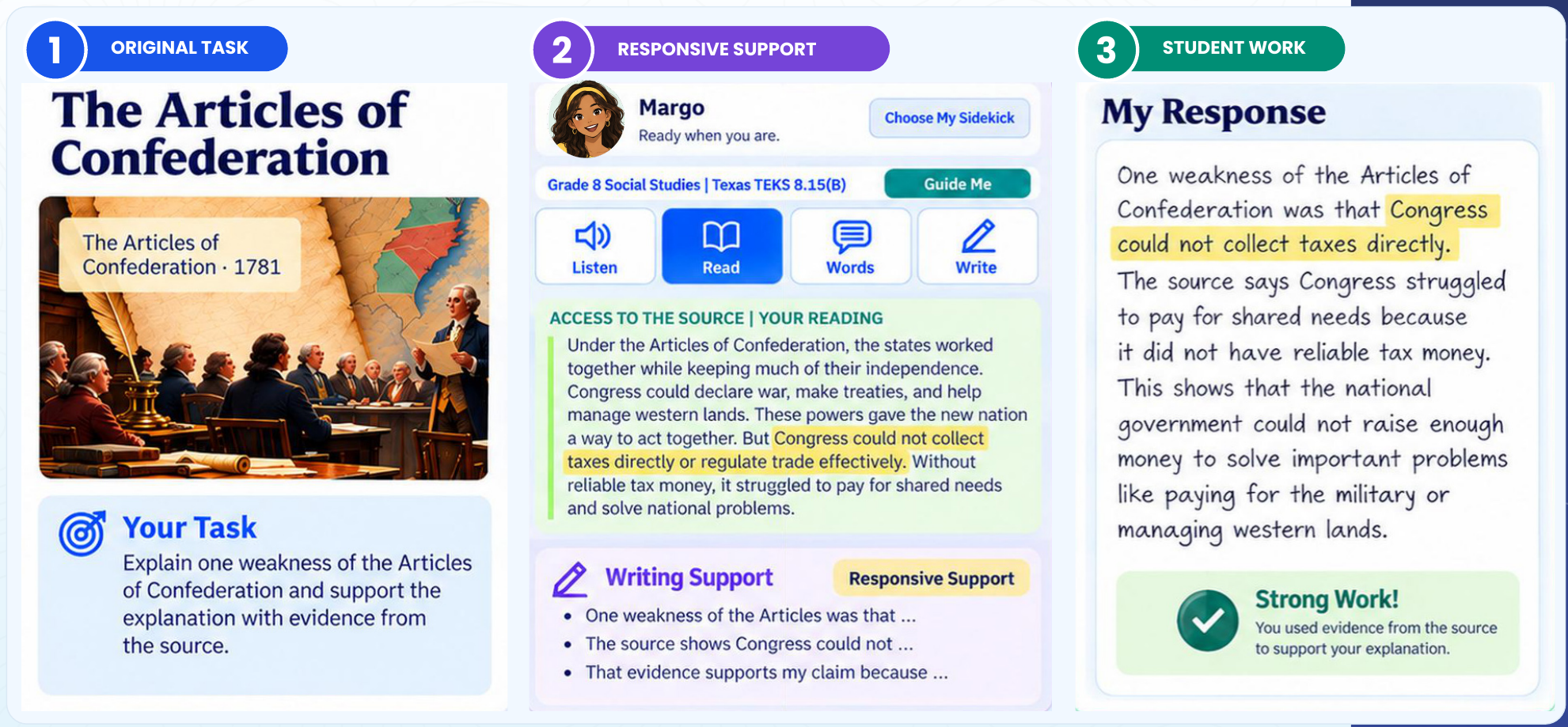
8th grade students build a clear argument in Social Studies

Grade 8 social studies example: the Articles of Confederation source, Margo's Sidekick panel with an accessible reading and sentence starters, and the student's evidence-based response
Margo, a Sidekick character

Sidekick provides the supports students need to read, reason, and respond.

The task: Students read a source on the Articles of Confederation. They must explain one weakness, and support their explanation with evidence from the source.

The support: Sidekick highlights key evidence for the student to focus on and helps students shape their argument.

The result: The student names the weakness, cites the source and explains its effect in their own words.

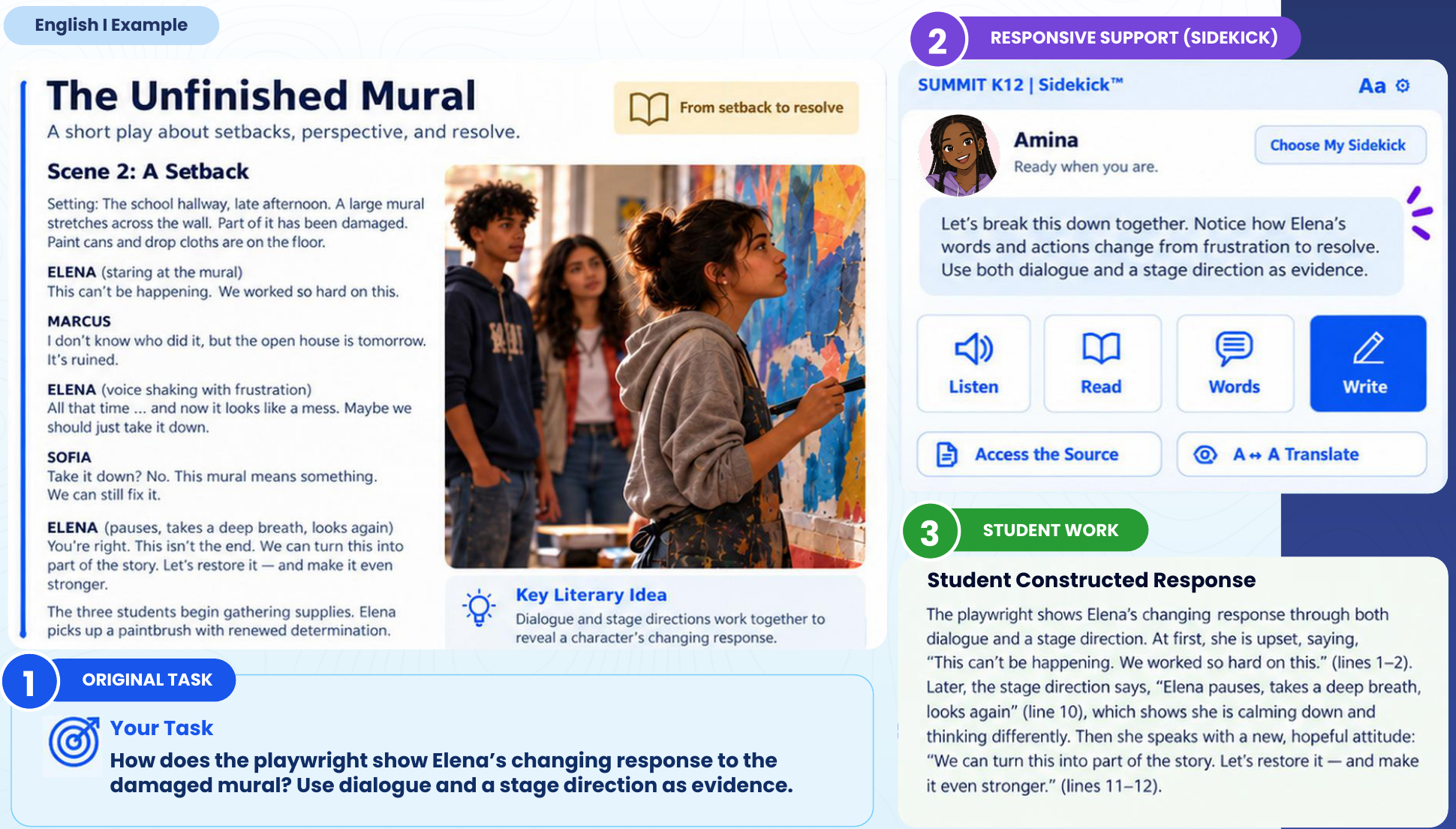
In English I, students are asked to interpret a play and provide evidence

English I example: Scene 2 of the play The Unfinished Mural, Amina's Sidekick prompt about Elena's changing response, and the student's constructed response
Amina, a Sidekick character

Sidekick provides the supports students need to read closely and write with confidence.

The task: Students read a short play, and answer a question, using dialogue and a stage direction as evidence.

The support: Sidekick breaks the task down, simplifies the language, translates or explains new words, and helps students to structure a written response.

The result: The student writes a constructed response that quotes from the play, cites a relevant stage direction and explains reasoning with evidence and line references.

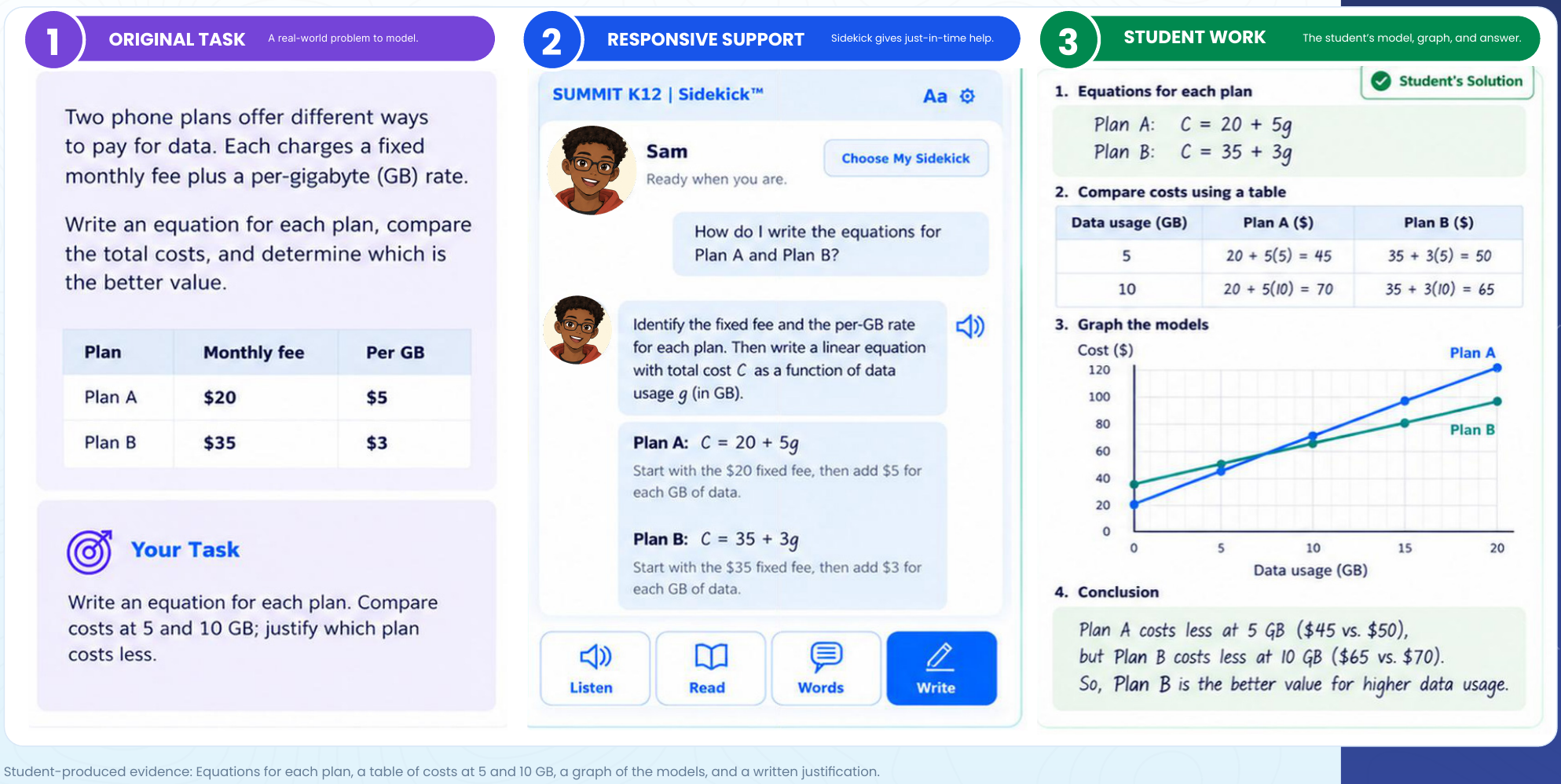
In Algebra I, students  model and compare plans to justify their answer

Algebra I example: the phone plan word problem, Sam's Sidekick guidance on writing linear equations, and the student's equations, table, graph and conclusion
Sam, a Sidekick character

Sidekick provides the supports students need to solve problems and explain results.

The task: Students write an equation to compare two phone plans and justify which plan provides better value for money.

The support: Sidekick guides students to identify each plan’s fixed fee and per-GB rate, then model total cost as a function of data usage. Audio support is available throughout.

The result: The student writes both equations, builds a table, graphs the models and justifies their answer.

Teachers Stay in Control

Teachers and districts can determine exactly how Sidekick is used in their classrooms.

Visibility

Choose what students and teachers see.

Permissions

Set who can access tools and data.

Accommodations

Require or limit specific supports.

Reporting

View class, campus or district progress.

Grounded in Research and Guidance

Sidekick's design is informed by decades of research on language development, disciplinary literacy, scaffolding, and effective instruction for multilingual learners.

Language and content belong together

Language standards connect to content standards, so support stays tied to the grade-level task.
(Lee, 2018; Lee, Quinn & Valdés, 2013)

Scaffolds are temporary and purposeful

Good scaffolding amplifies the curriculum instead of simplifying it, then fades as students gain independence.
(Gibbons, 2015; Walqui, 2006; Walqui & Bunch, 2019)

Every discipline has its own language

Science, math, history and literature each make meaning differently, so support must fit the subject.
(Fang & Schleppegrell, 2010; Schleppegrell, 2004, 2007)

Home language is an asset

Students' languages and experiences are resources for learning.
(García, Johnson & Seltzer, 2017; González, Moll & Amanti, 2005)

Language grows along a progression

Ongoing evidence of student language guides the next step.
(Bailey & Heritage, 2014; Gottlieb, 2016; Uccelli et al., 2015)

Read the Research

Frequently asked questions

What is Summit Sidekick?

Summit Sidekick (Summit Sidekick™) is a browser extension for Chrome, Edge and Safari that brings responsive language support into the lessons multilingual learners already use. It helps students in grades 3–12 engage with grade-level content, do the thinking the task demands, and show what they know. Sidekick is powered by Summit K12.

Who is Sidekick for?

Sidekick serves students in grades 3–12, including multilingual students, students with 504 plans or IEPs, and can support economically disadvantaged and highly mobile students. Teachers, campus leaders and district teams use its controls and reports to determine the level of support needed for each student.

How does Sidekick use Connect to Literacy data?

Sidekick connects to Connect to Literacy™ (C2L), Summit K12's English language development program. It draws on each student's current C2L Personalized Learning Plan progress, to measure proficiency by domain. That way, classroom support builds on the language students are working on in designated ELD block to reinforce language growth and provide Content-based language instruction (CBLI) throughout the school day.

How does Sidekick support multilingual learners?

Sidekick works in four steps. It analyzes the task, connects current learner evidence, provides the right support, and rechecks the student's response. Support moves across five levels, from Modeled Access to Independent Application, and increases, changes or fades as proficiency evidence changes.

How does Sidekick help students access grade-level content?

Sidekick keeps the original task and grade-level expectations intact. It adds supports such as adapted reading, visual cues, vocabulary help, structured discussion and response frames. The support changes so that grade level targets become achievable for every learner.

How does Sidekick complement ELD instruction?

Designated English Language Development builds core language skills. Sidekick carries that work into science, math, social studies and RLA, using current Connect to Literacy evidence where districts use C2L. It extends the work of ELD and ESL specialists, providing support for learners throughout the school day.

Do content teachers have to become ELD specialists to use Sidekick?

No. Sidekick provides language support inside the task, so content teachers can focus on their subject without having to adapt materials for Multilingual Learners. Teachers can see student work and support use, and set how Sidekick is used in their classrooms.

Does Sidekick replace our curriculum?

No. Sidekick is not a replacement curriculum. It works with your existing curriculum, bringing support into the lessons, assignments and texts students already use, with no curriculum changes required.

How is Sidekick different from a language-learning app?

A language-learning app teaches English as a separate subject. Sidekick supports students while they do grade-level academic work in their regular classes. Its support is tied to the task in front of the student and adjusts to what that student requires to access and reach grade level expectations.

How does Sidekick handle 504 accommodations and IEP supports?

Required IEP and 504 supports stay separate from optional scaffolds. They are never removed by adaptation. Teachers and districts can also require or limit specific supports.

What can teachers and districts control in Sidekick?

Teachers and districts set visibility (what students and teachers see), permissions (who can access tools and data), accommodations (which supports are required or limited), and reporting (class, campus or district progress).

What research informs Sidekick's design?

Sidekick draws on decades of research on language development, disciplinary literacy, scaffolding and effective instruction for multilingual learners. Sources include Gibbons, Walqui and Bunch, Schleppegrell, Lee, and García. The full reference list is available as a downloadable research basis.