Accelerate to Literacy™: Smarter Balanced

A Clear Path to Grade-Level Success

For every multilingual learner

Accelerate to Literacy Smarter Balanced meets each multilingual learner where they are across all four claims, builds essential skills and academic language through guided learning, and supports their progression toward independent, grade-level performance, with actionable reports that help educators identify next steps.

    Girl standing in classroom reading from a green book with a whiteboard behind her.

    Key Benefits of Accelerate to Literacy

    Start With an Accurate Picture

    Each skill is tested twice: once with language supports and once without. Teachers can see if a student needs to learn the skill or just needs language support to show it.

    Meet Students Where They Are

    Each student gets a pathway for each claim, based on screener results. A student might need more support in Writing but be ready for more challenge in Reading.

    Build Language Alongside Literacy

    Videos, vocabulary cards, sentence frames, and audio supports help students build the academic English that grade-level tasks require.

    Grow Into Independence

    Supports step back as skills grow. Every pathway ends at the same Bridge Task, with no scaffolds, so students show what they can do on their own.

    Practice That Mirrors the Test

    SBA Readiness Practice Quizzes match Smarter Balanced item types, task demands, and content specifications.

    Know What to Do Next

    Reports show how the class and each student did, by claim and target, so teachers know where to focus.
    Part of the Connect to Literacy™ Ecosystem

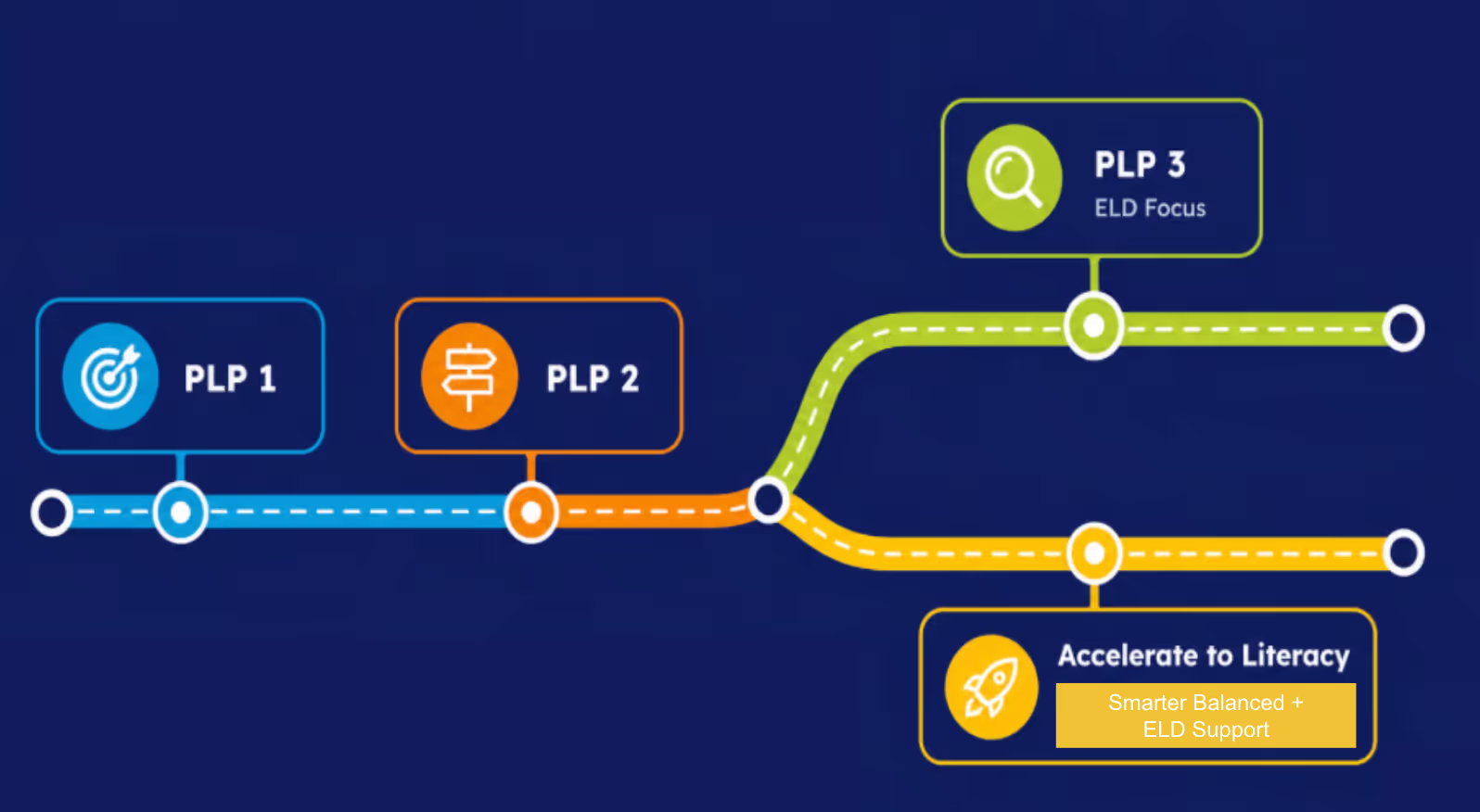
    Accelerate to Literacy: Smarter Balanced is a Connect to Literacy™ add-on for grades 3–12. It replaces PLP 3 with a Personalized Learning Pathway focused on grade-level literacy.

    Paired screener modeled after Smarter Balanced ELA blueprints, given with and without language supports
    Personalized Learning Pathways across Reading, Writing, Listening, and Research & Inquiry
    A Bridge Task and SBA Readiness Practice Quizzes that show independent, grade-level readiness
    Flowchart with three connected points labeled PLP 1, PLP 2, PLP 3, and a branch to Accelerate to Literacy.

    Built for Smarter Balanced States

    Accelerate to Literacy is built for districts in Smarter Balanced member states and territories, including California, Washington, Oregon, Nevada, Idaho, Hawaii, South Dakota, Michigan, Connecticut, Delaware, the District of Columbia, and the U.S. Virgin Islands. Wherever your district is, Accelerate to Literacy connects multilingual learners' language growth to the grade-level literacy skills the assessment measures.

    Explore Connect to Literacy™ for your region below.

    ELPAC - California

    Connect to Literacy™ offers English Language Development solutions specifically designed for learners in California.

    WIDA™

    Empower all multilingual learners (MLLs) to grow at least one proficiency level per year or your money back.

    ELPA21

    Connect to Literacy™ offers solutions to support the English Language Proficiency Assessment for the 21st Century.

    How Accelerate to Literacy Works

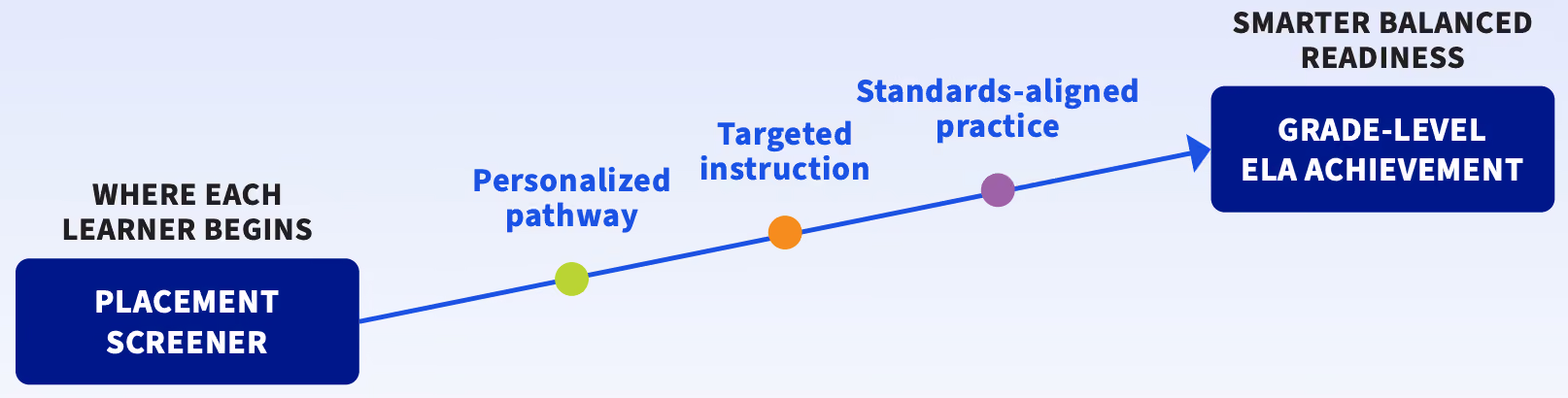
    Every student moves through the same three stages: Placement, Guided Learning, and Independence. Each stage builds toward one goal: independent, grade-level performance on the Smarter Balanced Assessment.

    Logo with a book and upward arrow next to text reading Accelerate to Literacy ELA Practice Assessments.
    Logo with a book and upward arrow next to text reading Accelerate to Literacy ELA Practice Assessments.

    Placement → Guided Learning → Independence

    Blue number one inside a white circle with a blue outer ring and shadow.

    Screener

    22 questions modeled on Smarter Balanced. Each skill is tested with and without supports. A separate Performance Task adds a no-support writing snapshot.

    Blue number 2 inside a white circle with gradient blue circular background.

    Pathway Placement

    Students are placed into one of four pathways for each claim. Every pathway works at grade-level rigor.

    Blue number three inside a white and gray circular button with a blue outer ring.

    Guided Learning

    An instructional video, vocabulary cards, and two lessons. Lesson 2 raises text complexity and independence.

    Blue number 4 centered in a gray circle with white and dark blue borders.

    Bridge Task

    One grade-level task, no supports. Every pathway meets here with the same expectations.

    Blue number 5 centered in a white circle with a dark blue outer ring.

    SBA Readiness Practice Quiz

    Shows if students are ready and what to teach next.

    Number 6 badge

    Reports

    Screener reports, PLP reports, and family progress reports show what each student needs next.

    Instructional Scaffolds

    Start strong, then fade as skills grow.

    Text Complexity and Independence

    Rise from lesson to lesson.

    Language Supports

    Present throughout Guided Learning, in the pathways that need them.

    It Starts With the Screener

    Every student begins with a short screener built from the Smarter Balanced blueprint. It shows what each student knows and what might be getting in the way.

    Step 1

    One ELA Skill

    Each skill is tested on its own.

    Step 2

    With and Without Supports

    Once with content and language supports, like vocabulary pop-ups, visuals, and writing frames. Once without.

    Step 3

    Compare Performance

    The two results are compared side by side.

    Step 4

    Pathway Placement

    Each student is placed into the pathway that fits each claim.

    Paired Assessment

    Each skill is assessed twice across 22 questions, once with supports and once without. This separates ELA skill mastery from possible language barriers.

    Equity Through Language Access

    Half the items include supports, so multilingual learners can show what they know without being held back by their English proficiency.

    Modeled From SBA Design

    Items mirror Smarter Balanced style, rigor, and language. They are built from a modified SBA blueprint for less testing time and a clear snapshot.

    Data-Driven Placement

    Comparing supported and unsupported results places students in pathways that teach the content with the language support they need.

    The Screener Performance Task

    A separate two-question task at grade-level rigor, with no content or language supports. Students can complete it in its own session. It informs students and teachers but does not affect pathway placement.


    Where Performance Task Skills Show Up

    ✓ In the screener: a performance task completed without supports.

    ✓ Throughout guided learning: skills tied to performance task success are spiraled across the pathway.

    ✓ At the end of the Claim 4 pathway: another performance task after skills are built.

    Image: a2l-performance-task.png

    A Personalized Learning Pathway That Replaces PLP 3

    For Connect to Literacy™ partners, A2L Smarter Balanced takes the place of PLP 3, and the rest of your program stays the same. Instead of one path for everyone, each student is placed into a pathway for each claim based on screener results.

    Pathway 4

    P4

    Starts at grade-level rigor and moves to above grade-level text complexity in Lesson 2.

    Pathway 3

    P3

    Grade-level content that levels up in text complexity and independence.

    Pathway 2

    P2

    Grade-level content with extra content and language supports in both lessons.

    Pathway 1

    P1

    Starts at lower text complexity and moves up to grade-level complexity in Lesson 2, with extra content and language supports in both lessons.

    Example: One Student, Four Pathways

    Placement happens claim by claim, so support matches each skill area. Every pathway still ends at the same grade-level Bridge Task.

    Reading

    Pathway 2

    Writing

    Pathway 1

    Listening

    Pathway 3

    Research & Inquiry

    Pathway 2

    Claims Open on a Set Schedule

    Each claim opens on its release date. Until then, students see a locked bar and greyed-out activities, so their progress bar stays accurate. When the claim is released, the bar disappears and the activities open.

    Image: a2l-claim-release-student-view.png

    Guided Learning

    Explicit Instruction, Built-In Support

    Each claim pathway follows the same guided learning path: an instructional video, vocabulary cards, and two lessons that build toward independence.

    Instructional Videos

    ✓ Provides explicit instruction in target concepts and skills.

    ✓ Models thinking and strategies to approach SBA tasks.

    ✓ Reinforces the use of academic language.

    ✓ Shows collaborative dialogue and cooperative learning.

    ✓ Introduces characters who return in Lesson 1 to give just-in-time support.

    Video thumbnail: a2l-instructional-video-thumbnail.png (links to sample video)

    Image: a2l-vocabulary-cards.png

    Interactive Vocabulary Cards

    Grade-specific card sets build the academic and content vocabulary students need to access complex ELA tasks and express their thinking with precision.

    Text with a story draft for a school magazine, word highlights, a firefly photo, and an interactive definition tooltip.

    Lesson 1: Guided Learning

    Lesson 1 builds skills in three steps. First, students target the skills, with the standard and success criteria modeled by the video characters. Next, they build them step by step through focused activities that each build on the last. Then they apply with guidance, bringing the pieces together on a standards-aligned culminating task. Scaffolds along the way include think-alouds, partner tips, sample responses, feedback, graphic organizers, writing checklists, and content and language supports.

    Interactive Writing Tools

    Graphic organizers help students type their ideas into a clear frame. Writing checklists help them check their work in six key areas.

    Image: a2l-writing-tools.png

    Image: a2l-lesson1-vs-lesson2.png

    Lesson 2: More Complexity, More Independence

    Lesson 2 practices the same skills with harder text and fewer supports, so students take on more of the work themselves.

    Supporting Language, Sustaining Rigor

    Language supports help students reach grade-level content without lowering the bar.

    ✓ Chunked passages

    ✓ Images and visual support

    ✓ Vocabulary pop-ups

    ✓ Interactive graphic organizers

    ✓ Word banks

    ✓ Model responses

    ✓ Sentence frames

    ✓ Audio glossary (Listening)

    ✓ Speak, then write

    ✓ Language function and feature pop-ups

    Image: a2l-language-supports.png

    Independence

    Bridge Task: Independent Application

    Every pathway meets here with the same expectations. Students show what they can do on their own before moving into SBA-style assessment.

    Highest Text Complexity

    Within the grade level.

    A Single Lead-In

    Bridges from guided learning to SBA independence.

    Scaffold-Free

    Instructional and language supports are removed.

    SBA Readiness Practice Quizzes

    Modeled after the Smarter Balanced Assessment in:

    ✓ Item types

    ✓ Task demands

    ✓ Content specifications

    ✓ Performance expectations

    Results Provide

    ✓ Evidence of readiness for independent, grade-level performance

    ✓ Next instructional steps

    Image: a2l-sba-practice-quiz.png

    Reports That Show Clear Next Steps

    From the first screener to the last practice quiz, every report answers one question: what should we teach next? Explore the four ways teachers, leaders, and families see progress.

    Screener Reports: Four Views of Every Class

    Teachers open screener results from the Reports button on the My Courses page. One color key runs across every report, so patterns are easy to spot.

    Class Overview


    How did the class do overall? See who is done, the top and bottom claims, the class average, and the lowest-scoring questions.

    Analysis by Claims & Targets


    Which claims and targets need attention? See average mastery and the median score for every claim and target, with the Performance Task in its own row.

    Overview by Question


    How did the class do on each question? Preview any item with its claim, target, standard, DOK, and support tag, plus each student's result.

    Student view


    How did each student do, with and without supports?
    ‍

    Table showing student names with their assessment and PLP progress percentages.

    PLP Report: Progress Across All Four Claims


    See class progress at a glance, then drill into any claim.


    Class Overview


    Average PLP completion, how many students have finished, are in progress, or have not started, and each student's results by claim.


    Claim Pages


    Reading, Writing, Listening, and Research & Inquiry each have their own page with completion, claim scores, and scores for every target.

    Ready-Made Groups


    Student groups come straight from pathways, so small-group planning is already done.
    A student can be in a different group for each claim.

    One Click to Review


    Open any student's learning pathway right from the report.

    TEKS table showing percentages by genre for 5.3(A) to 5.6(E) including Fiction, Poetry, Drama, and others.

    Review Screen:
    Every Response, Question by Question


    Teachers and students can step through every answer in one place.


    Switch Students


    See every student's score in one list and move between students in a click.


    Filter and Jump


    Filter by result and go straight to any question.

    Question Details


    See the claim, target, support tag, and genre at a glance, with the question shown exactly as the student saw it.

    Feedback and Scoring


    See the correct answer next to each response. Teachers can review and adjust AI-generated scores on the same screen.

    Table shows percentages for TEKS standards 5.3(A-E) and 5.6(C-E) across reading and revising categories.

    Family Progress Reports: Keep Families in the Loop

    Share clear progress reports with every family. Send to families in 40+ home languages.


    Assessment Results


    Screener and Performance Task scores, each with a plain-language summary.


    Learning Pathway Progress


    Progress by claim, skill strengths and needs, and tips for learning at home.

    In Each Family's Language


    Teachers choose the language for each student's report.

    Ready to Share


    Add a guardian signature line, then view or download any report.

    Table showing student test scores in four performance categories: Did Not Meet, Approaches, Meets, Masters.

    Frequently Asked Questions

    What is the Smarter Balanced Assessment?

    The Smarter Balanced Assessment is an English Language Arts (ELA) summative assessment used by a group of member states and territories, including California, Washington, Oregon, Nevada, Idaho, Hawaii, South Dakota, Michigan, Connecticut, Delaware, the District of Columbia, and the U.S. Virgin Islands.

    Which students is Accelerate to Literacy designed for?

    Accelerate to Literacy: Smarter Balanced is built for multilingual learners in grades 3–12.

    How does Accelerate to Literacy support multilingual learners on the Smarter Balanced Assessment?

    It meets each multilingual learner where they are across all four claims. A paired screener places students into a Personalized Learning Pathway for each claim. Guided lessons build skills and academic language, then a Bridge Task and SBA Readiness Practice Quizzes show progress toward independent, grade-level performance. Reports give educators clear next steps.

    Does Accelerate to Literacy replace Connect to Literacy™?

    No. Depending on your state, Accelerate to Literacy: Smarter Balanced is an add-on to your existing C2L California, WIDA™, or ELPA21 C2L program. It replaces PLP 3 with a Personalized Learning Pathway focused on grade-level literacy, while the rest of your program stays the same.

    What are the four Smarter Balanced claims?

    Reading, Writing, Listening, and Research & Inquiry. Accelerate to Literacy: Smarter Balanced gives each student a Personalized Learning Pathway in all four.

    How do families stay informed?

    Teachers can view or download a progress report for each student, in the family's language, with an optional guardian signature line.