
PLP Comprehensive Redesign
- Structured Time – consistent minutes + pacing across PLPs
- Smarter Design – activities tagged by time + rigor
- Combined Pathways – integrated domains
- Better Reporting – progress vs. expected pace (norm)
- District Controls – adjust settings, pacing, and pathways
- Goal – more predictable, data-driven, personalized learning

Why this Matters
Because scale scores are continuous, they capture growth even when a student hasn't moved to the next proficiency level yet.Take two students. Both score at Level 2 on the ELPA21. Same level, same label — but their scale scores tell a different story:
Student A: Scale score 1,382 — Level 2
Student B: Scale score 1,461 — Level 2
A proficiency level alone treats them as identical. Their scale scores don't. Student B is nearly at the threshold for Level 3.
Student A needs more foundational support before they get there.
Connect to Literacy uses that precision to build a PLP learning pathway tailored to where each student actually is in their Second Language Acquisition journey — not just the level printed on their report.
What You'll Love
- More precise PLP-1 creation using scale scores
- Less manual setup at beginning of year
- Daily instruction tied to ELPA results and growth plan
- Students start on a path that reflects where they left off
Overview
Summit K12 has added enhanced metadata tags to more than 50,000 ELD items and activities across multiple dimensions—including estimated completion time, linguistic complexity, cognitive complexity, interaction complexity, domain alignment, standards alignment, and more—through a new Task Demand Framework.
This expanded tagging gives the personalization engine a far more sophisticated foundation for sequencing instruction, calibrating pacing, and ensuring students experience intentional progression across the PLP pathway.
What You'll Love
- 50,000+ items tagged with rich, multi-dimensional metadata
- Skills sequenced to build language demands gradually
- Smarter pacing based on completion time and complexity
- Aligned to ELD standards and state ELA/Literacy standards
- Balanced coverage across listening, speaking, reading, and writing

Overview
Each PLP now has a clearly defined instructional window and recommended usage model, creating more consistent implementation across schools and classrooms. Using the enhanced tagging system and Task Demand Framework, the platform can now balance instructional time across language domains, alternate activities strategically, and ensure tasks become progressively more challenging throughout the pathway.
What You'll Love
- More precise PLP lengths using demand and activity timings
- Balanced coverage across all four language domains
- Task demands increase gradually throughout the pathway
- Steady, manageable pacing for students
- Shared usage model for consistent implementation across classrooms
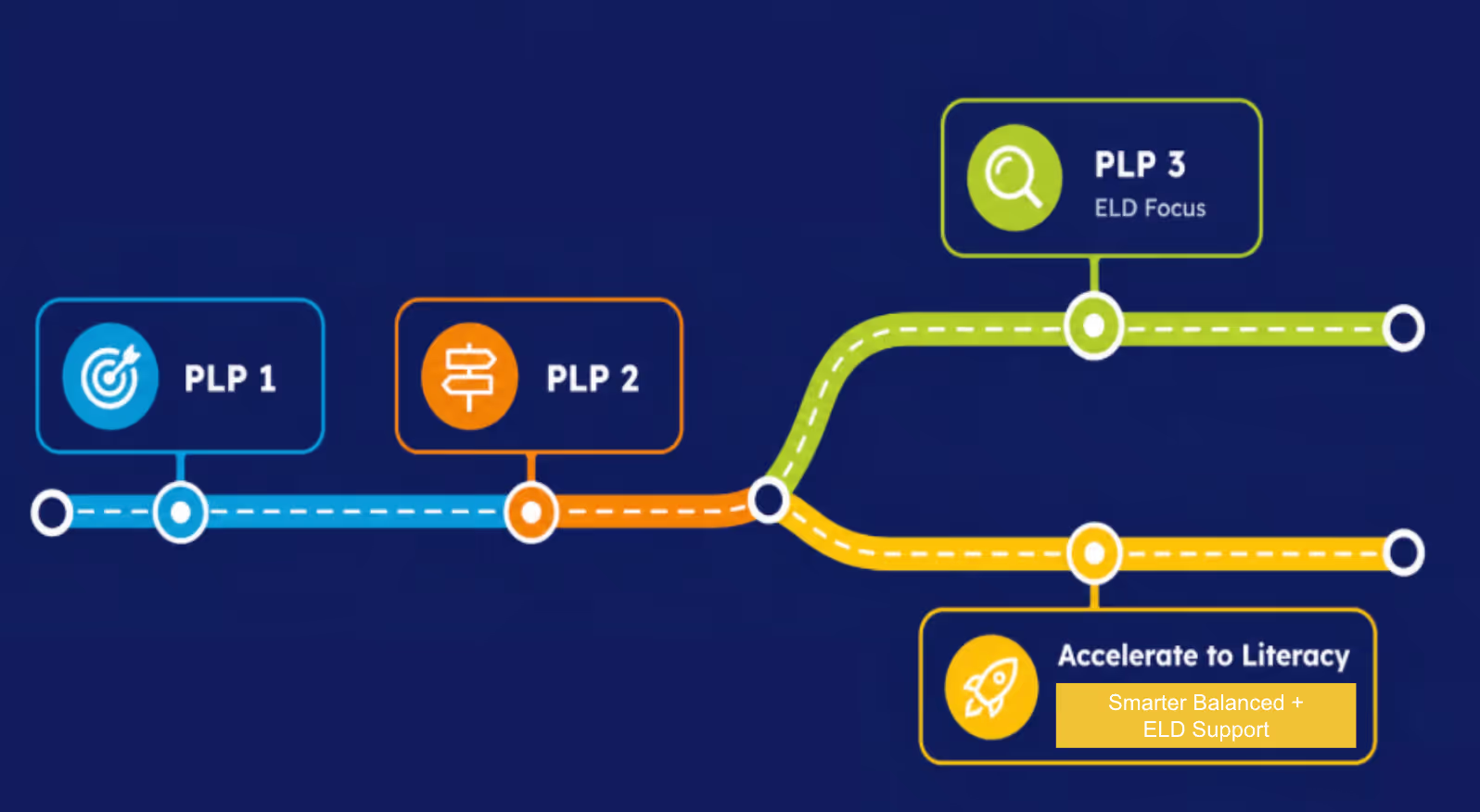
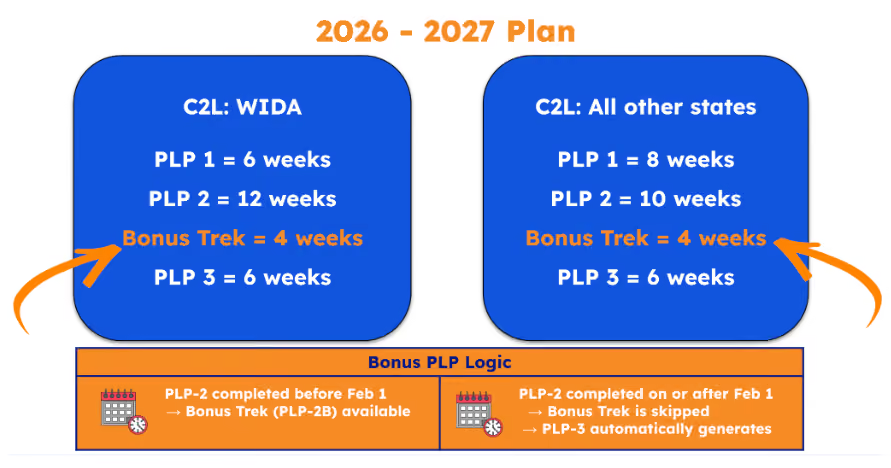
Standardized PLP Duration 2026-2027
PLP 1 = 8 weeks
PLP 2 = 10 weeks
PLP 3 = 6 weeks (ELD focus)
OR
A2L-SB PLP* = 6 weeks SBAC aligned in 3rd–8th & 11th grades
*Only for states using the Smarter Balanced Assessment
Overview
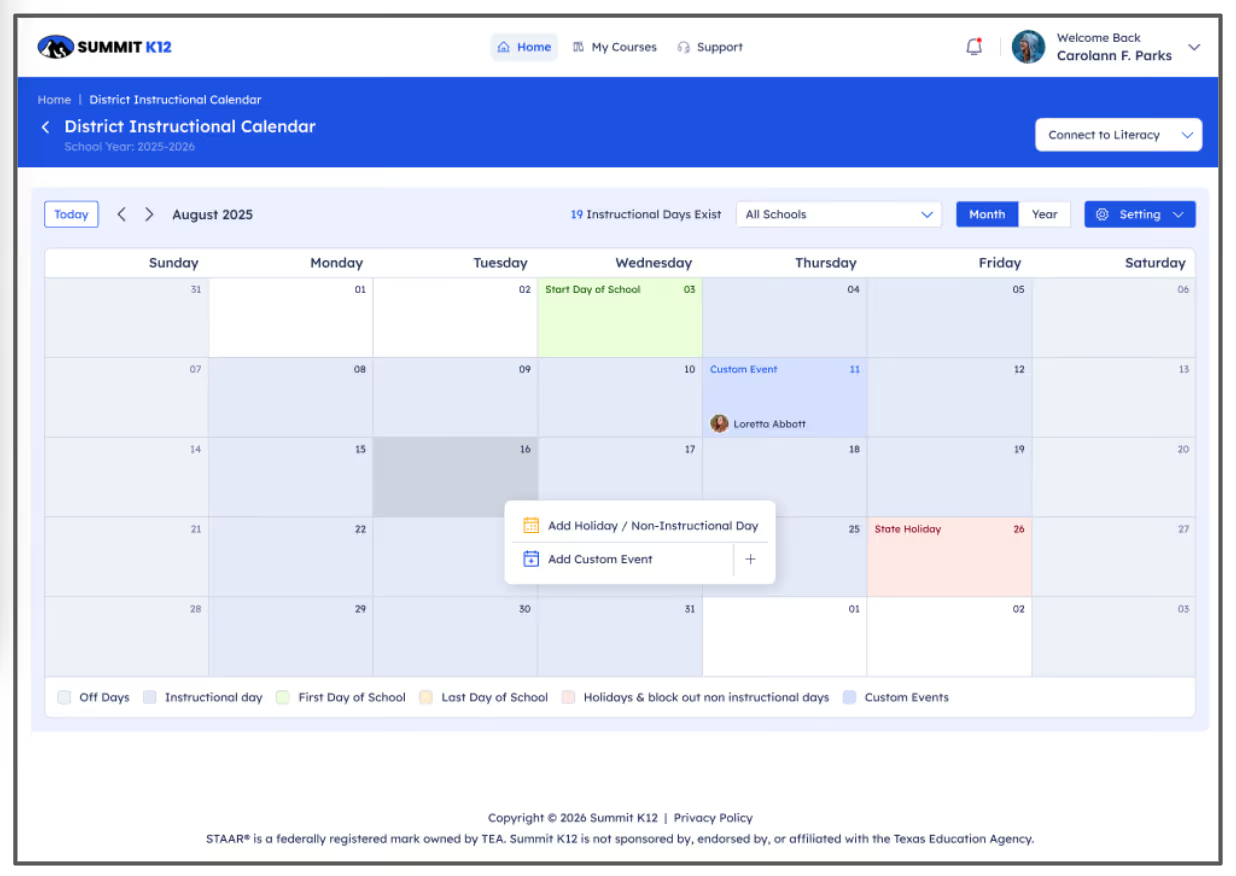
Districts can now define instructional and non-instructional days directly within the Connect to Literacy platform, and the system uses that calendar to continuously track student progress against expected pacing within the PLP pathway. Together, these two components—the district calendar and the new pacing line reporting view—give teams a more accurate, real-world picture of where students are and where they should be, even as schedules shift throughout the year.
What You'll Love
- Define instructional and non-instructional days directly in the platform
- Pacing targets automatically recalibrate when the calendar changes
- All edits logged with timestamps, user details and change descriptions
- Expected and actual completion shown side by side
- Color-coded bars for quick reads on student status
- Completion, pacing, and performance combined in one view

Overview
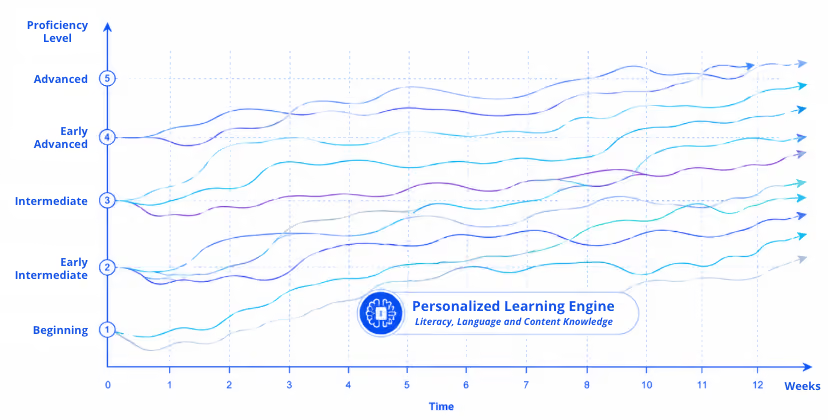
By leveraging the Task Demand Framework, enhanced item tagging, proficiency data, and domain combinations, the system can now generate approximately 6,500 unique starting pathways within each grade-level band. This means students are far more likely to begin on a pathway shaped by their specific language profile—and the system continues to adapt as their needs evolve throughout the year.
What You'll Love
- ~6,500 unique starting pathways per grade-level band
- Structured time - consistent minutes + pacing across PLPs
- Better reporting - progress vs. expected pace (norm)
- Goal - more predictable, data-informed personalized learning
Overview
The platform now includes a color-coded performance indicator that compares each student's PLP performance against their proficiency level and expected learning trajectory. This gives educators a quick read on not just whether students are completing activities, but whether they're engaging with them in a meaningful way—flagging potential issues like guessing or rapid clicking before they add up.
What You'll Love
- Measures quality of engagement, not just completion
- Color-coded status - ahead of pace, on pace, or at risk
- Early warning for low-quality practice patterns
- Concrete data for discussions about effort and engagement

Overview
Partners asked for more control over how PLPs are structured, prioritized, and accessed—and we're delivering! A new district-level admin panel gives administrators the ability to prioritize domains, lock earlier PLPs, and deactivate specific domains, putting key decisions about PLP structure, pacing, and access directly in the hands of district teams.
What You'll Love
- Reorder domains so students start with their most critical needs
- Lock earlier PLPs to keep students focused on current work
- Deactivate domains to ensure priority areas are completed first
- All controls in a single admin settings view

Overview
When a student completes PLP-2 ahead of the projected pacing timeline, the system now automatically deploys a Bonus Trek (PLP-2B) with fresh learning experiences that maintain appropriate rigor—no repeated content and no gaps in instruction leading up to the state assessment.
What You'll Love
- Fast-moving students keep going with new, meaningful activities
- Bonus Trek deploys automatically—no teacher setup needed
- Same level of rigor and personalization as the core PLP
- System now adapts for acceleration, not just intervention
Overview
PLP-3 has been reimagined as a focused 6-week pathway that unlocks after the state English language proficiency assessment, giving districts a purposeful plan for the final weeks of the school year. Districts can choose between a traditional ELD-focused pathway or a new Accelerate to Literacy Smarter Balanced (A2L-SB)* option that emphasizes the Claims and Targets of reading, writing, listening and research of the Smarter Balanced Assessment.
*Only for states using the Smarter Balanced Assessment
What You'll Love
- Purposeful instruction continues after testing is over
- Choose traditional ELD or Accelerate to Literacy Smarter Balanced pathways
- A2L-SB* emphasizes reading, writing, listening and research for grades 3-8 and 11
- Unlocks automatically based on assessment window timing
New Products
Connect to Literacy continues to grow across the full K–12 multilingual learner journey—with new pathways for the youngest learners, fresh starting points for newcomers, and stronger accountability tools for district teams. Watch the video to hear from our SVP of Product Development, Sarah Johnson.

.avif)
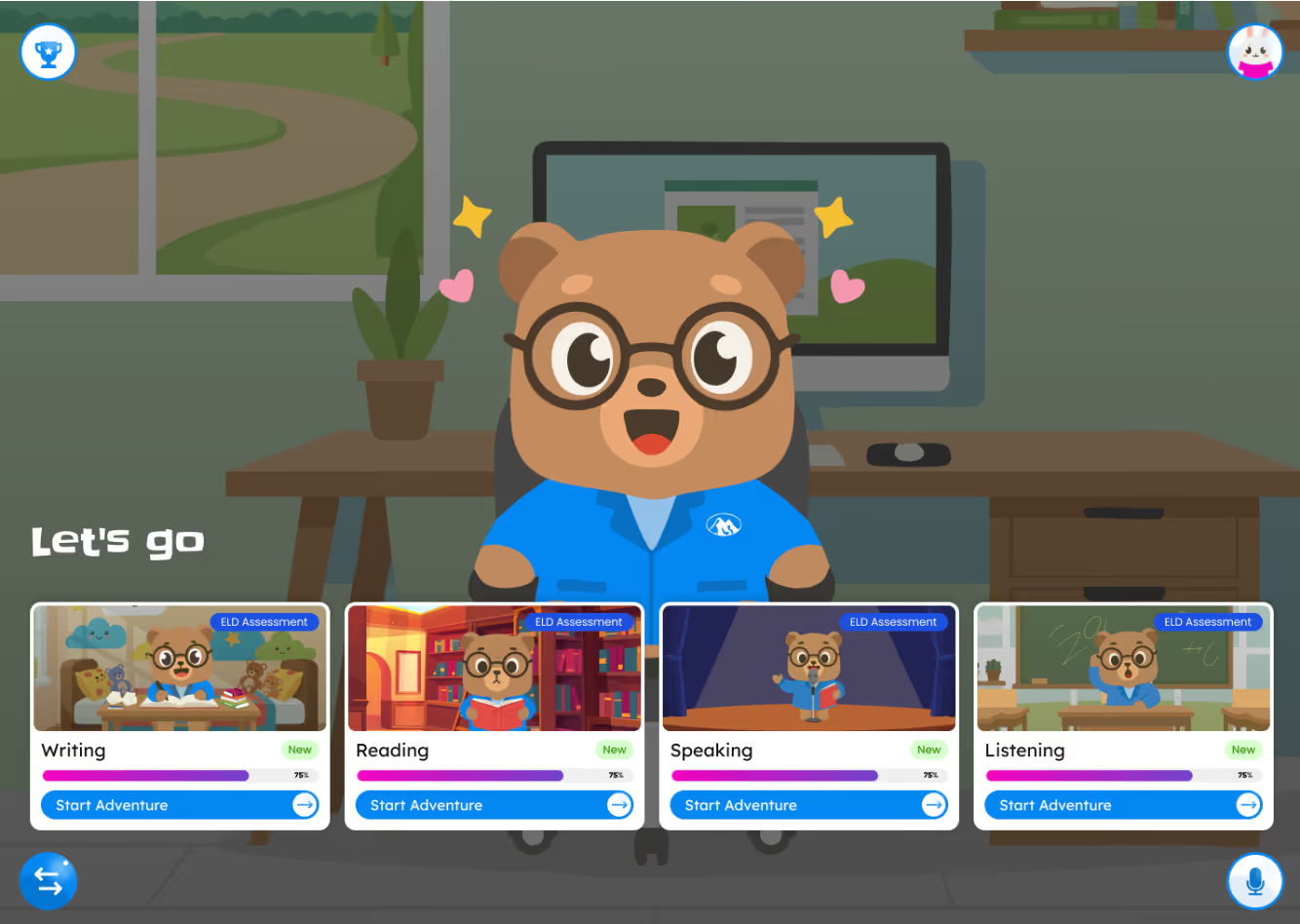
K–1 Trailblazers is a brand-new pathway inside Connect to Literacy, built specifically for the youngest multilingual learners. Guided by Benny the Bear, the experience pairs foundational literacy with oral language development from a child's very first day on the platform. Every screen is designed iPad-first and touch-first so children learning to read can engage with confidence—no reading ability required.
What You'll Love
- Audio and visually guided — no reading ability required
- iPad-first, touch-based interactive experience
- Benny the Bear guides students through lessons and navigation
- 9 themes, 28 trails, 24 activity types in a consistent 8-lesson flow
- Teachers can assign, monitor, and review within the same platform
- Encouraging by design — no red X's, just supportive feedback
Essentials is a new Connect to Literacy pathway built for newcomers and Level 1 students, focused on the real-world communication skills students need to settle into school. With age-appropriate content for grades 2–5, 6–8, and 9–12, Essentials gives newcomers a welcoming on-ramp that flows naturally into the rest of the C2L experience as they grow.
What You'll Love
- Focused on social and conversational English to help newcomers settle in
- Age-appropriate content for grades 2–5, 6–8, and 9–12
- Structured lesson flow with retry and supportive feedback built in
- Lives inside PLP-1 pathways for a seamless C2L experience
- Assign full lessons or target specific activities
- Track attempts, progress, and mastery in one view
Sample Essentials
2-5
Click to view

Sample Essentials
6-8
Click to view
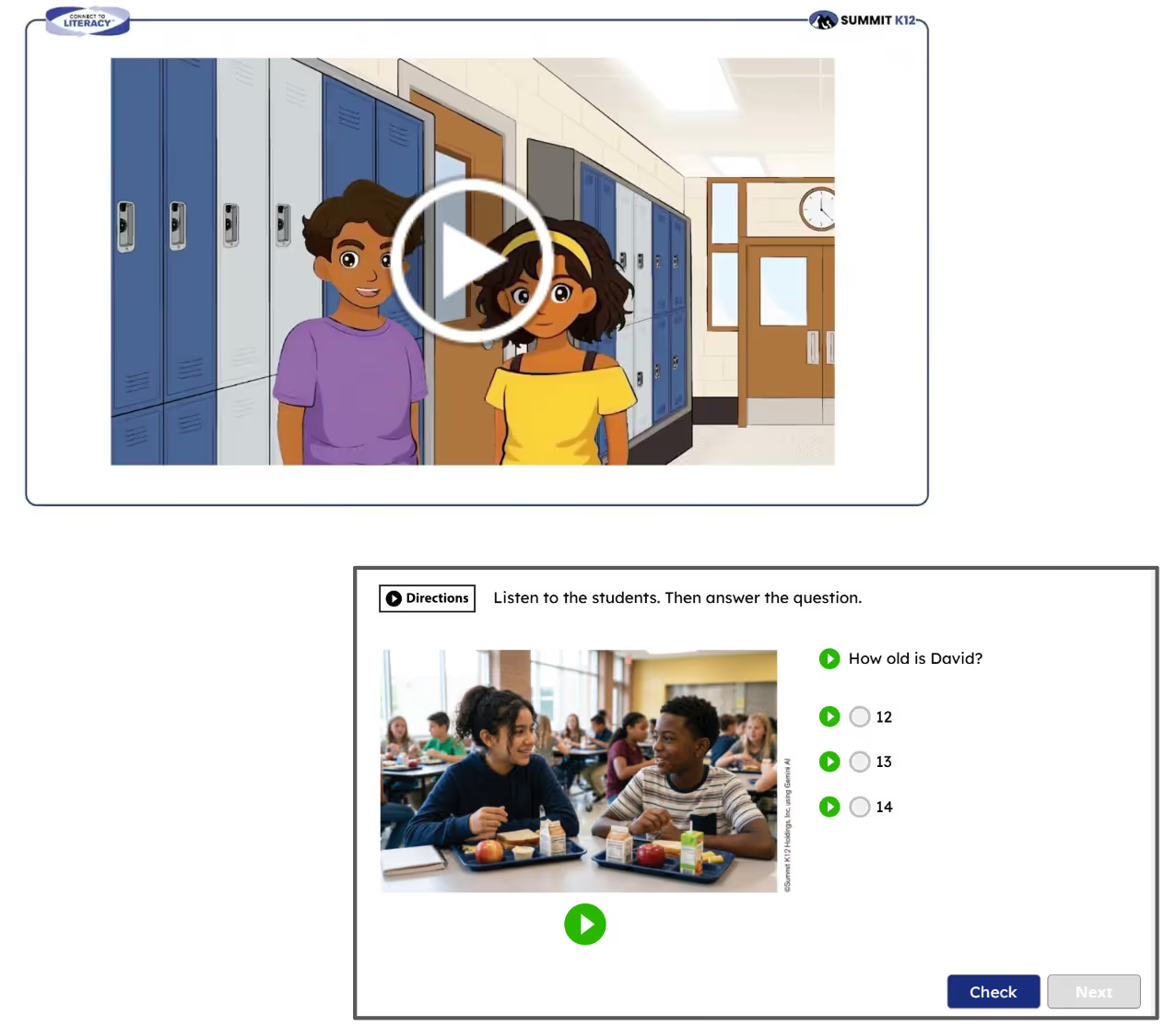
Sample Essentials
9-12
Click to view
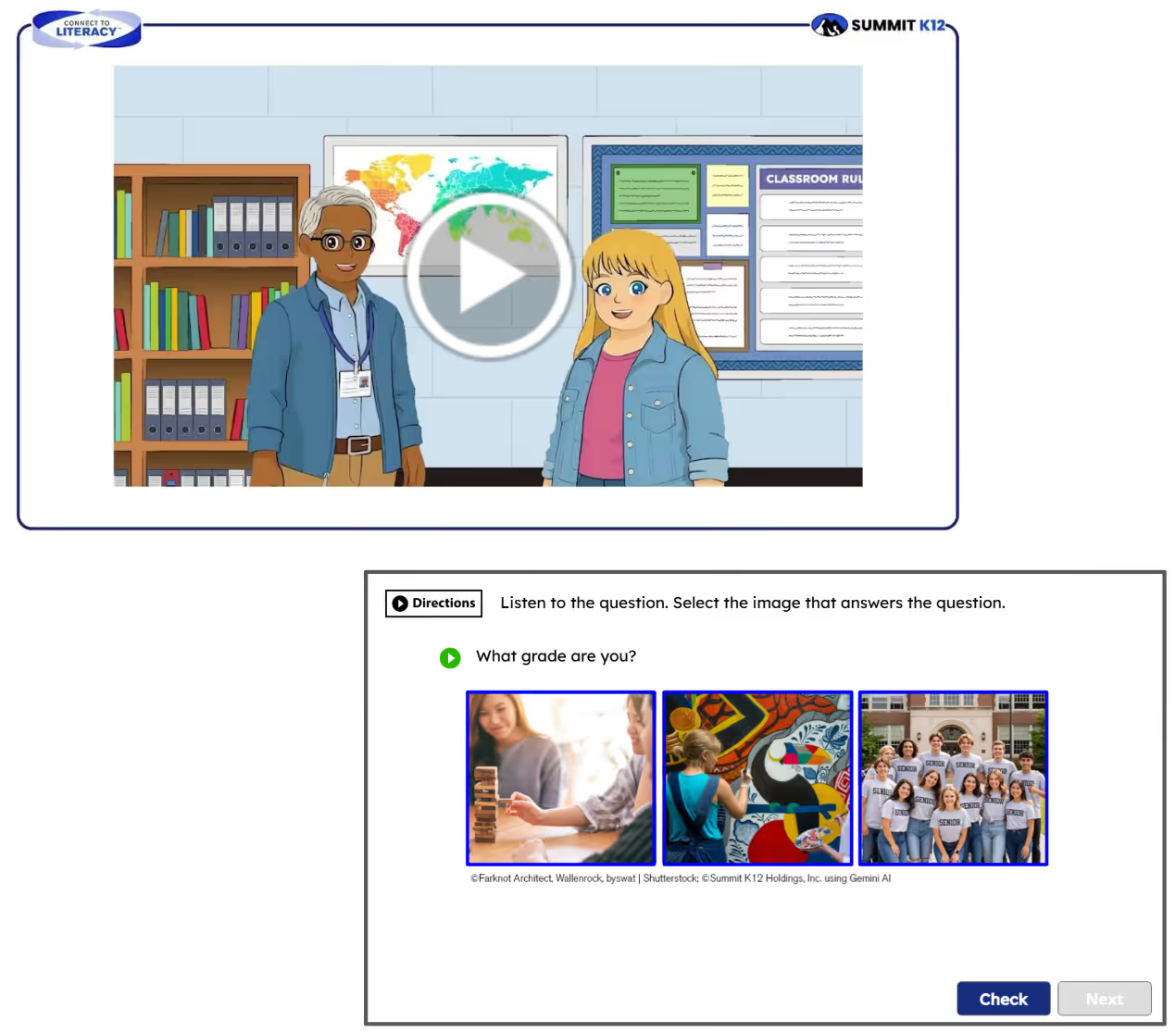
Overview
A2L Smarter Balanced* is a new product for grades 3–8 and 11 that brings together a screener, personalized instructional pathways, and a standards-aligned item bank—all built around the Smarter Balanced ELA blueprints. Every component includes embedded language support so multilingual learners can access grade-level content while building the skills they need for state assessments and reclassification.
*Only for States using the Smarter Balanced Assessment
What You'll Love
- Screener modeled after SBAC ELA blueprints with embedded language support
- Personalized pathways across Reading, Writing, Listening, and Research/Inquiry
- Grade-level rigor with built-in scaffolds for language learners
- Flexible item bank for custom, standards-aligned assignments
- Connects language development and ELA test readiness in one experience
Product Enhancements
Overview
The AI inside Connect to Literacy keeps getting sharper. Scoring has been further calibrated against real human-scored responses at each proficiency level, and grade-band, and new tools help students actually understand and act on their feedback—not just see a score. Dynamic audio reads feedback aloud, revised responses show students an improved version of their own work, and a clean three-tab teacher view makes reviewing and overriding scores faster than ever.
What You'll Love
- AI scoring better calibrated to human grading
- Dynamic audio reads specific feedback aloud with one click
- Revised responses based on the student's own work, not generic examples
- Teachers can override any AI score — changes reflected automatically
- Rubric, feedback, and revised response organized in a clean three-tab view
- Faster scoring accuracy means less waiting for students and teachers
.avif)
Overview
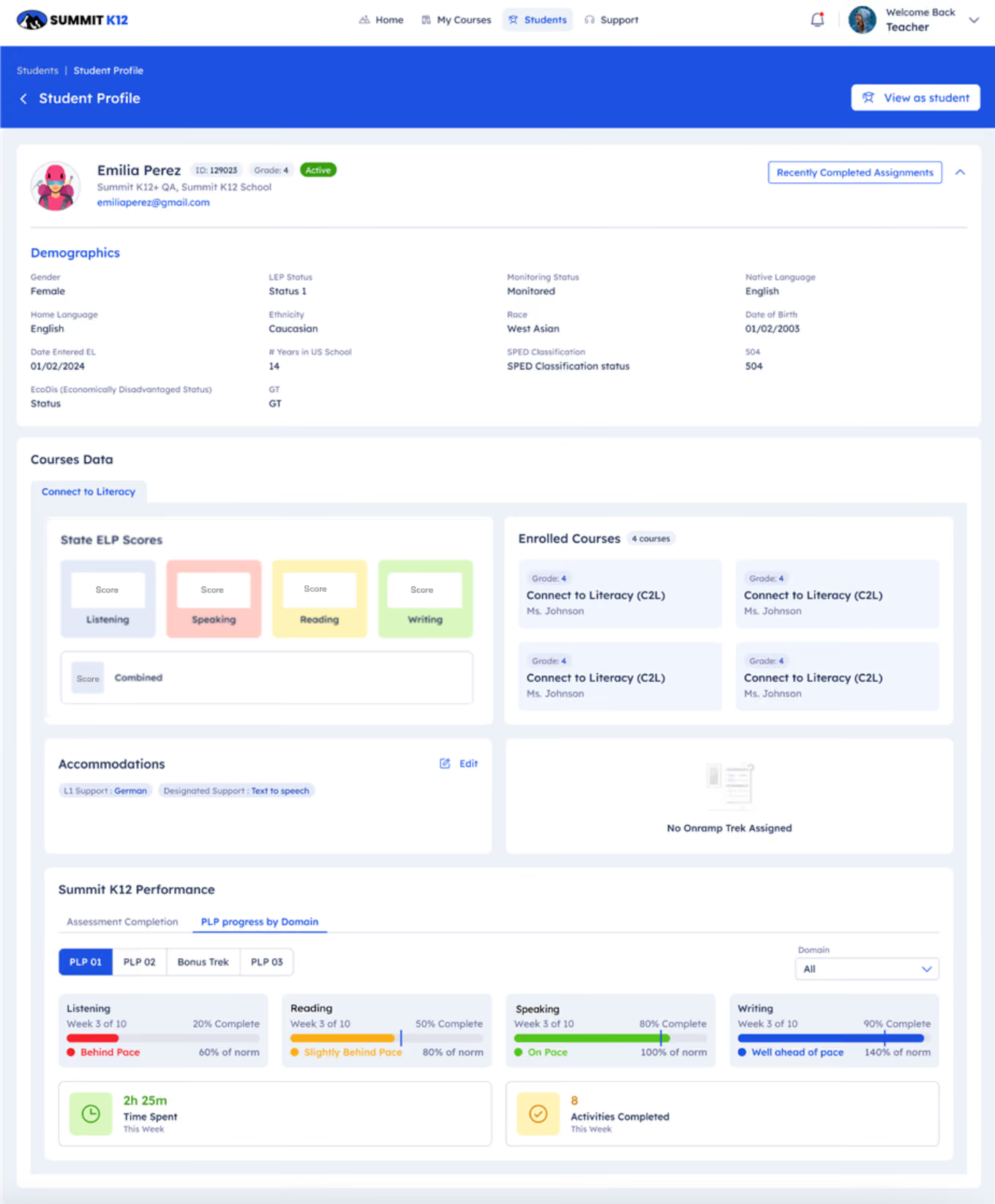
Until now, getting the full picture on a student meant jumping between multiple systems. The new Student Profile Page changes that—putting everything teachers, administrators, and EL coordinators need into a single view so they can spend less time searching and more time making decisions that help students.
What You'll Love
- PLP progress, pacing, time spent, growth data, and accommodations in one view
- Walk into any meeting fully prepared
- District-wide student search from a new top-level Students tab
- View-as-Student button to see exactly what the student sees
- Assign On-ramp treks directly from the profile
- One unified view the whole team works from
Overview
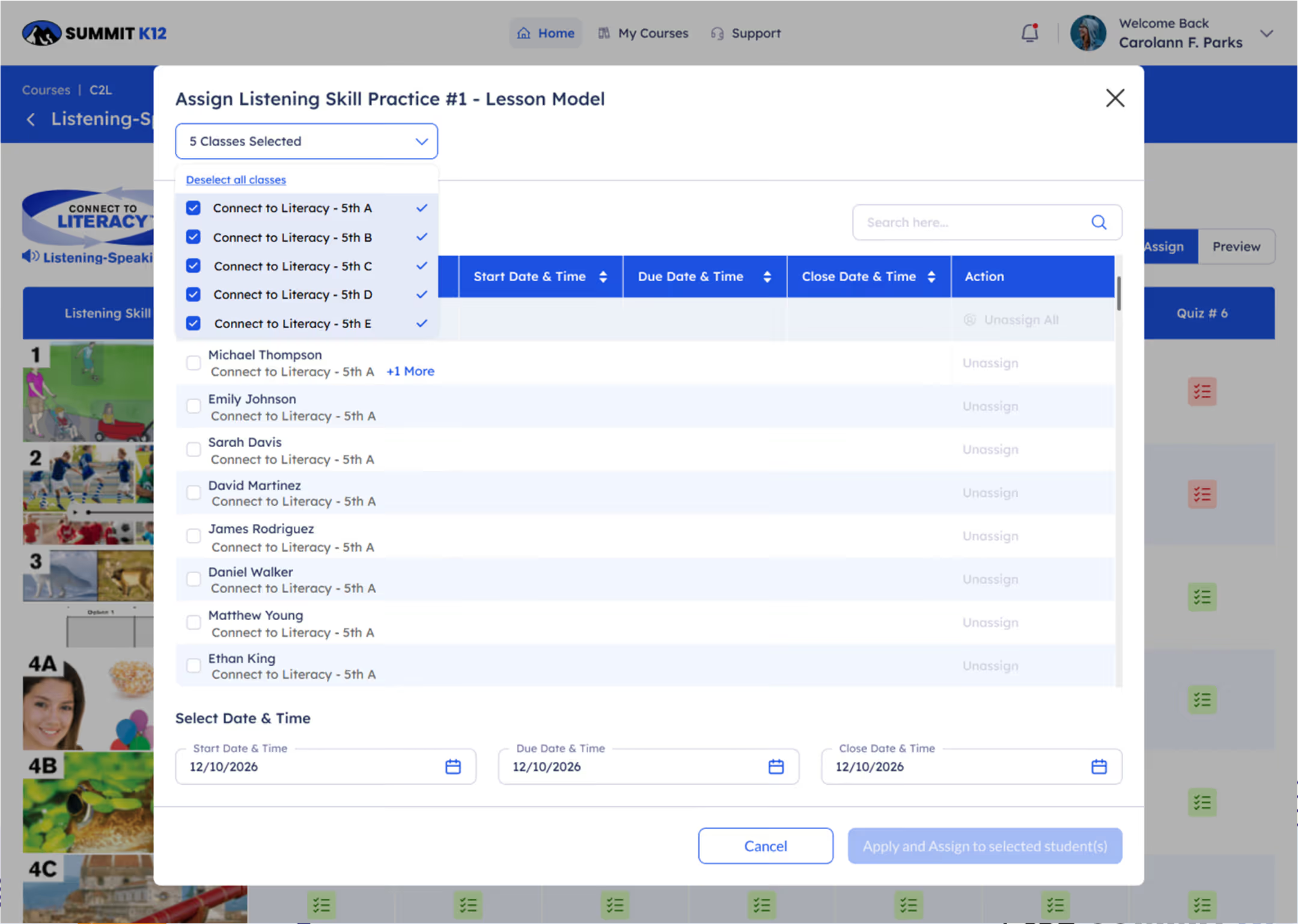
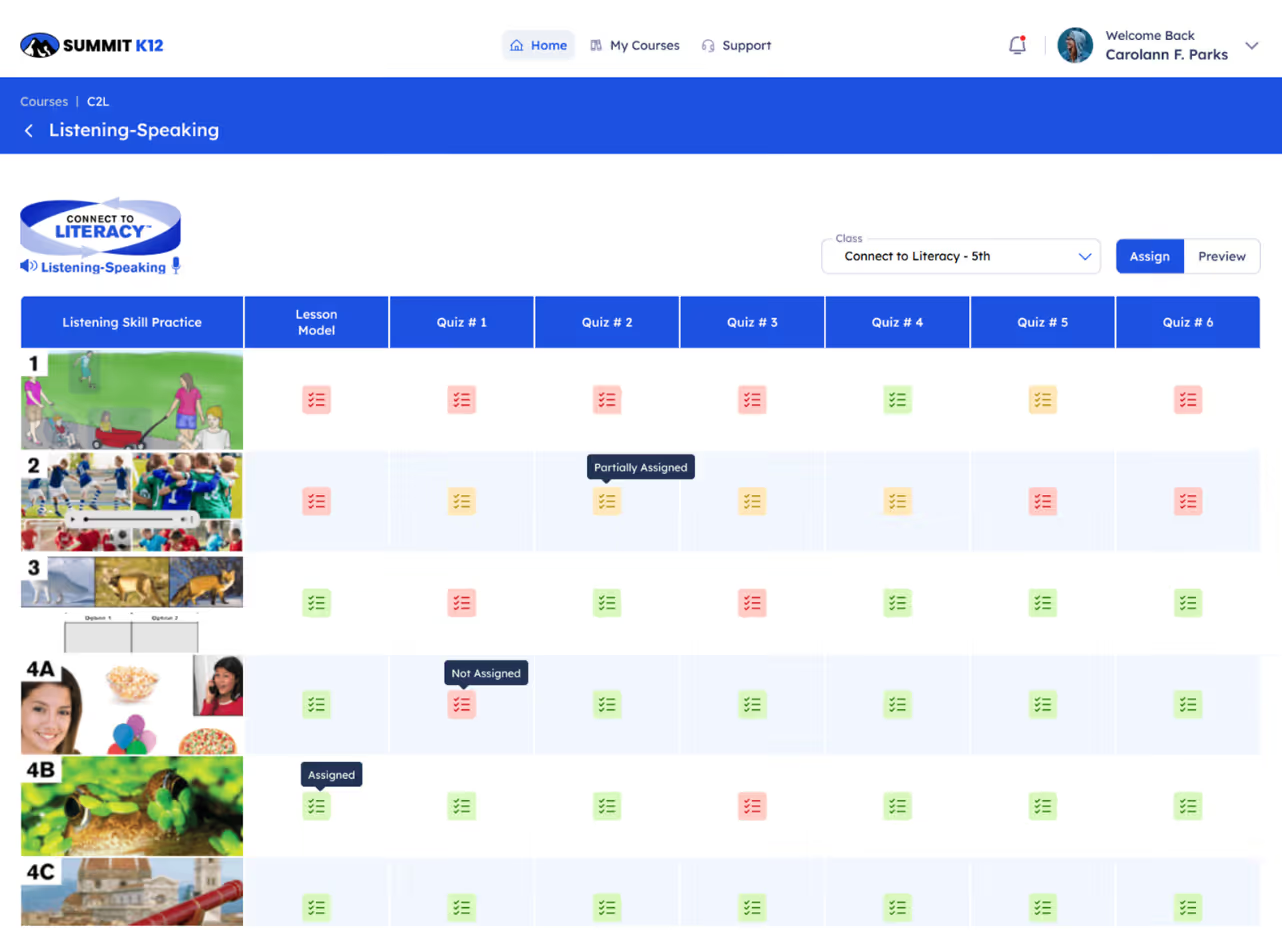
Several of the most common teacher workflows have been streamlined based on direct partner feedback. Actions like assigning across multiple classes now happen in a single flow instead of repeating the same steps for each section—giving teachers real time back for planning, feedback, and working with students.
What You'll Love
- Assign to multiple classes and reset attempts easily
- Fewer repetitive clicks—meaningful time back each week
- Streamlined workflows make onboarding new staff easier
- Less time on logistics, more time on students
Overview
The platform now catches rapid guessing more effectively and requires students to complete quizzes before a PLP can be marked done. These updates build on earlier guardrails and reflect partner feedback about wanting reports that truly represent real student effort.
What You'll Love
- Updated Avalanche Warning catches rapid guessing earlier
- Avalanche Warning calibrated more closely with the time it takes to complete an activity
- All questions must be attempted to submit an assessment
- Reports reflect real student effort, not just click-through

Overview
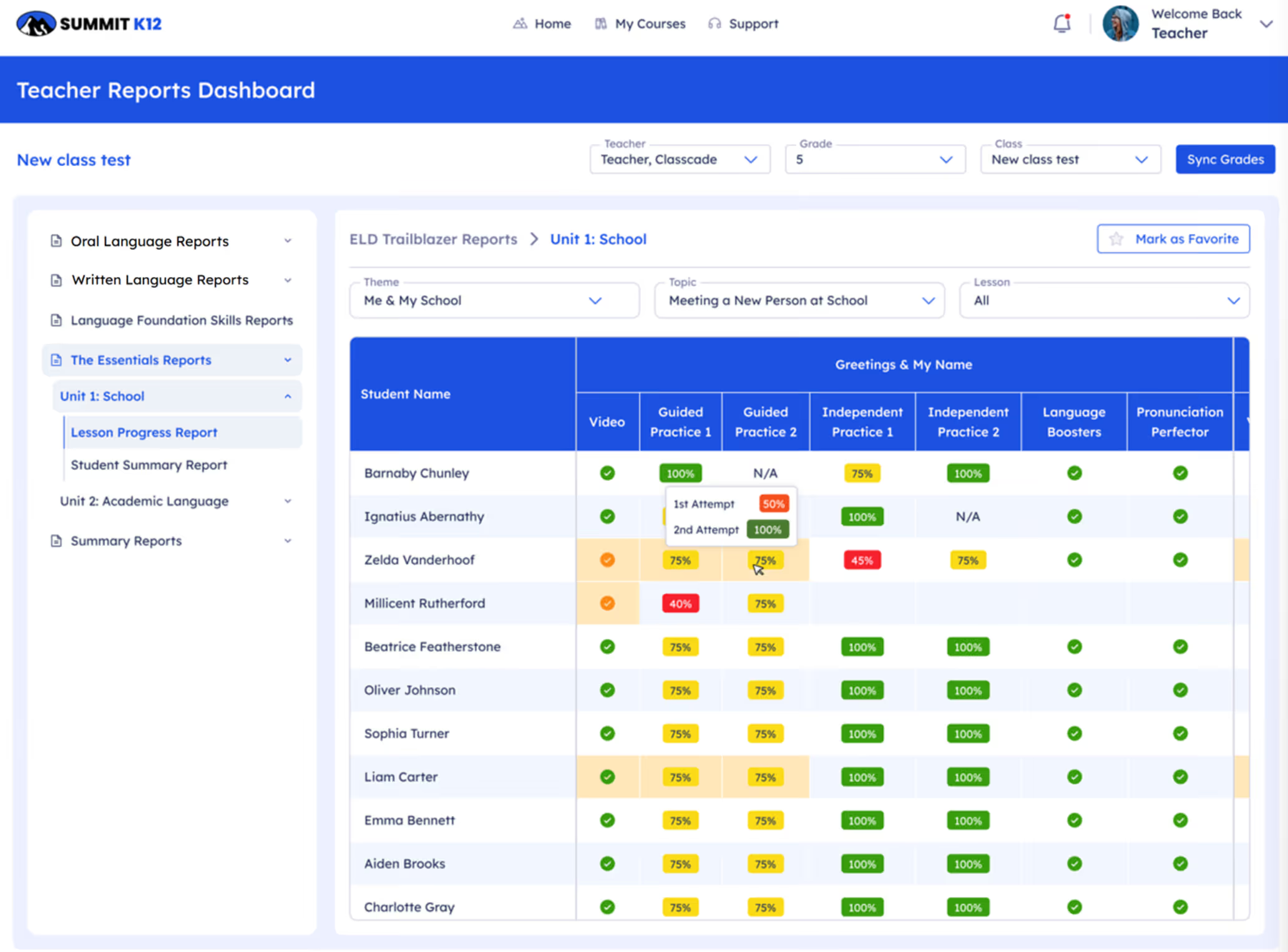
Connect to Literacy now gives students a second chance to show what they know. Instead of a one-and-done model, the system sets a 50% quiz mastery threshold—and if a student doesn't reach it on the first try, a structured second attempt automatically unlocks. The higher score is the one that counts. Mistakes are part of learning, and students deserve a clear path to show their growth.
What You'll Love
- 50% mastery threshold with a built-in second attempt
- Highest score is the one that counts
- Smart guardrails ensure the retry is a real learning opportunity
- Reinforces a growth mindset through the platform itself
Overview
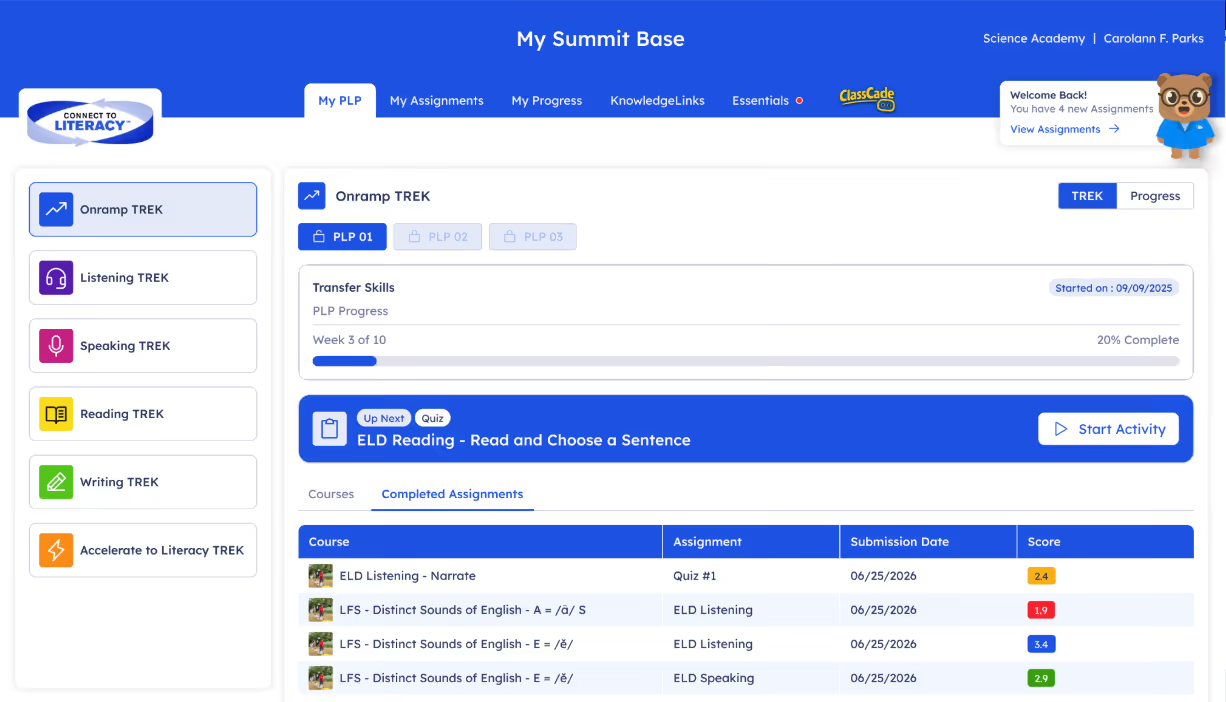
The onramp experience for newcomers and Level 1 students has been strengthened with additional scaffolds, visual supports, and confidence-building moments—all inside a focused 6-week trek. These updates reflect how important those first few weeks are for students just starting their English language journey, and make sure they feel supported and successful before moving into the broader PLP pathway.
What You'll Love
- Focused 6-week trek with a clear, manageable starting point
- Includes new content in all grade levels from the Essentials module
- Additional visual scaffolds and confidence-building activities
- Welcoming, approachable first experience on the platform
- Flows naturally into PLP-1 without disruption
Content Enhancements and Professional Learning
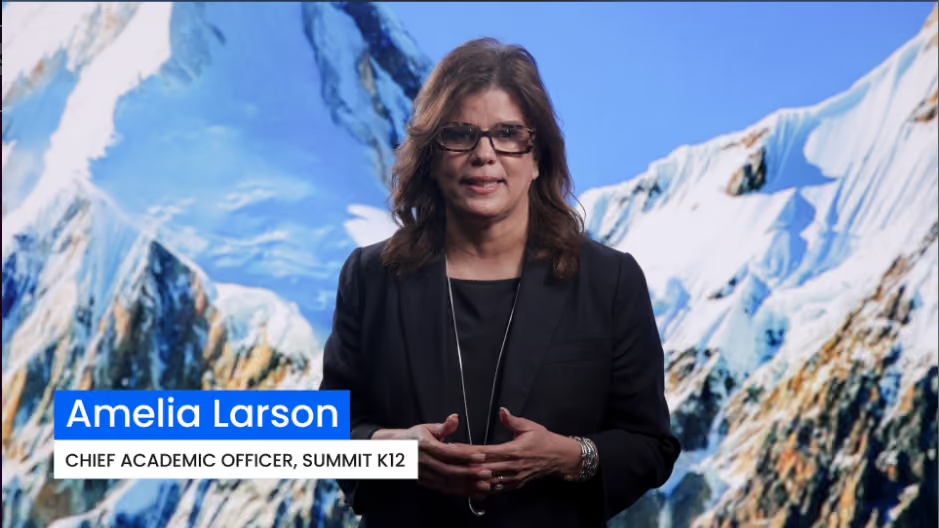
Content across the platform has been expanded to better connect language development to grade-level learning—shaped by ongoing collaboration with nationally recognized experts and organizations in multilingual education. Watch the video to hear from our CAO, Amelia Larson.
Overview
Summit K12’s instructional and assessment systems are continuously refined through collaboration with nationally recognized experts and organizations to ensure our solutions reflect current research, real classroom implementation needs, and evolving understandings of multilingual learner success.
What Our Partnerships Bring
Collaboration with Dr. Margo Gottlieb, co-founder of WIDATM
- Assessment Blueprint
Partnership with the English Learner Success Forum (ELSF)
- Research-informed instructional design
- Stronger coherence across instruction and assessment
- Focus on language functions and features across content
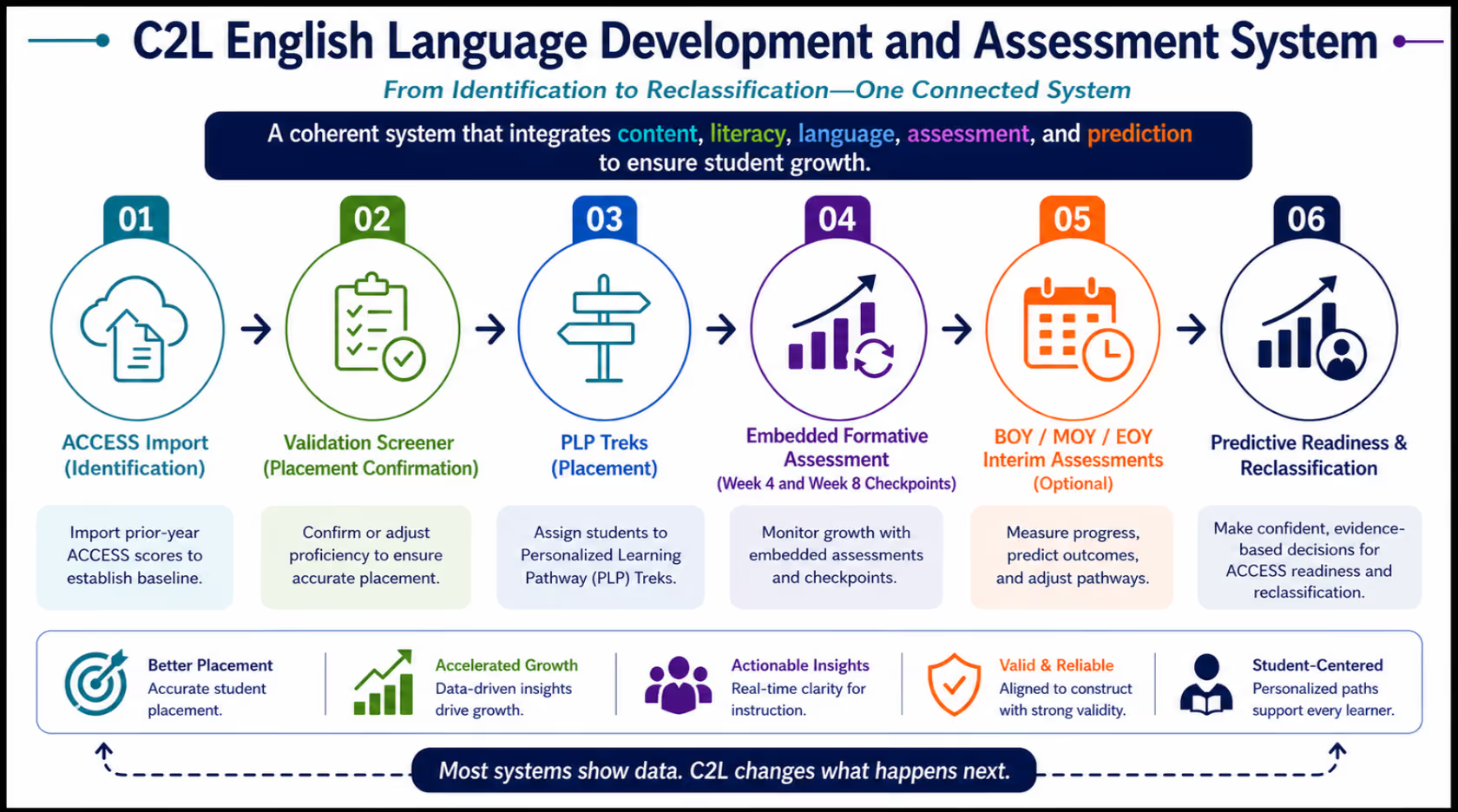
Overview
Summit K12 helps districts operationalize Content-Based Language Instruction through coherent systems that connect language development, academic content, instructional scaffolds, assessment, and classroom practice. Summit K12 creates solutions and equips teachers and leaders with practical tools, implementation guidance, and instructional routines that help English learners actively engage in rigorous academic learning across disciplines.
What You'll Love
- Embed language functions within grade-level content
- Strengthen speaking, writing, reading, and collaboration
- Scaffold instruction without reducing rigor
- Use formative evidence to guide instruction in real time
- Build instructional consistency across classrooms
Overview
Professional Learning has been refreshed and expanded to cover every new pathway, PLP update, and AI tool rolling out this year. New role-based sessions for teachers, coaches, and administrators make it easier for districts to get everyone up to speed quickly—with practical strategies your team can put to use right away.
What You'll Love
- Tailored sessions for teachers, coaches, and administrators
- Covers Trailblazers, Essentials, PLP updates, AI tools, reporting, and more
- Available on-demand and live to fit any district calendar
- Support stronger implementation with less internal lift
Overview
Summit K12 moves beyond generic MLL strategies by providing differentiated instructional support tied to grade-level bands, proficiency levels, language domains, and standards frameworks.
What You'll Love
- Grade-band differentiated support
- Instructional guidance differentiated by proficiency levels
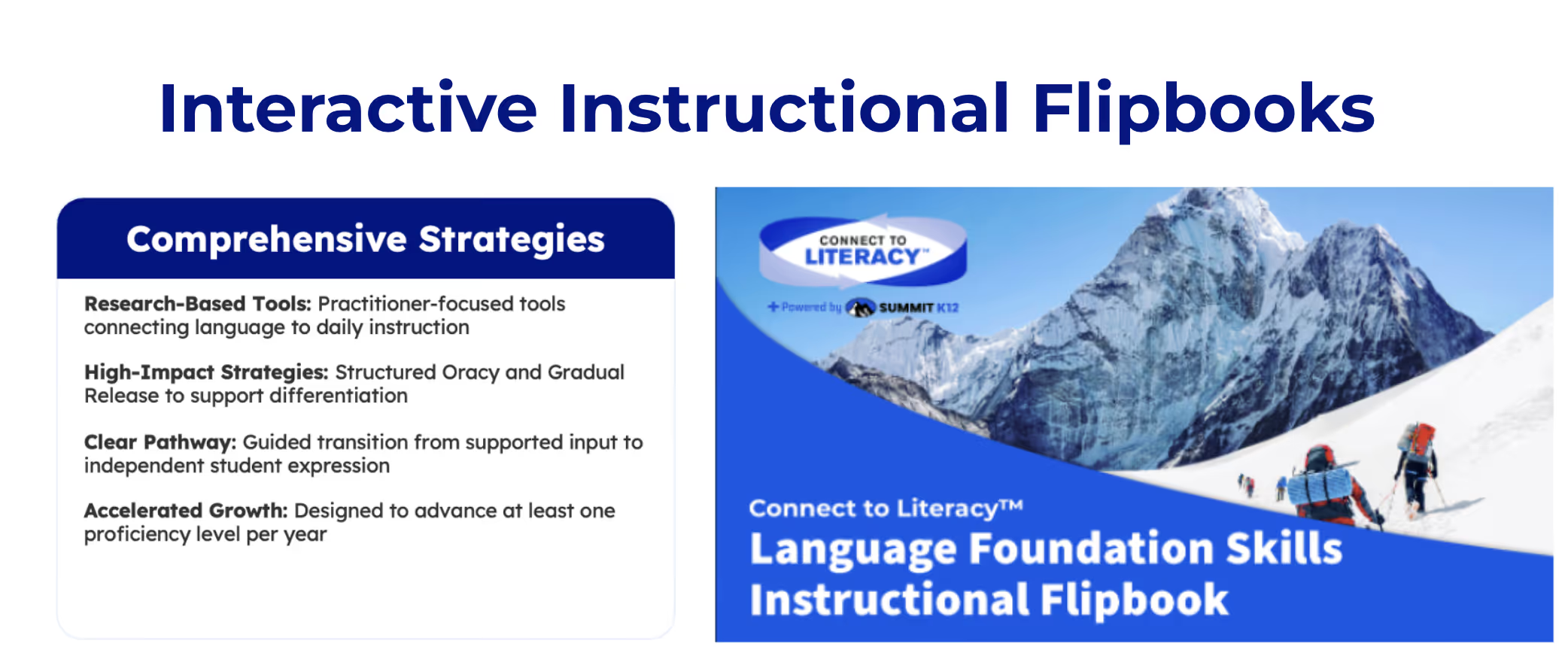
- Interactive Flipbooks and Implementation Guides
- Real-time instructional moves for teachers
- Practical instructional strategies for immediate classroom use
Overview
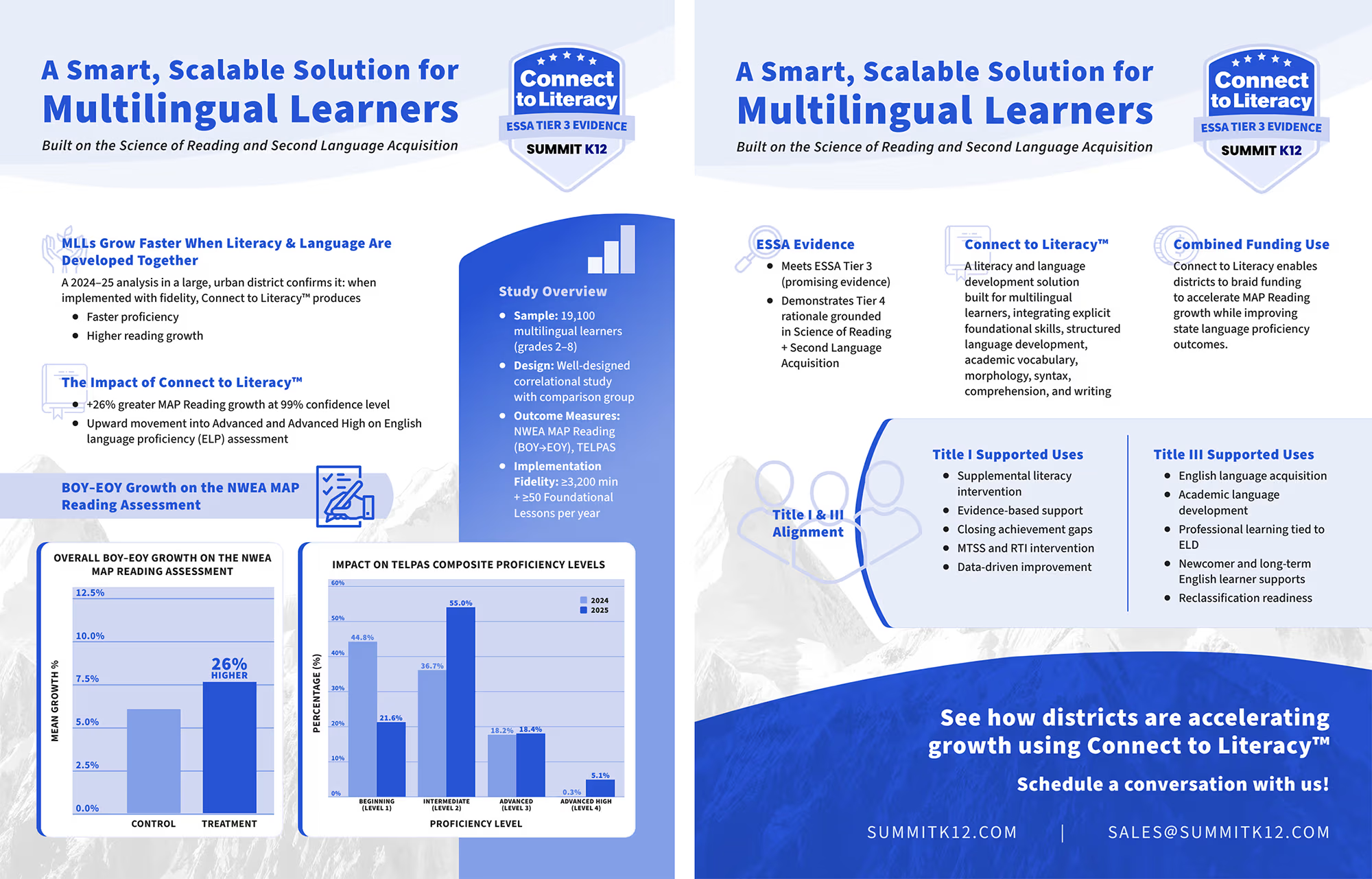
Summit K12 integrates the Science of Reading, Science of Learning, and Science of Instruction through a multilingual learner lens. Rather than separating language development from literacy instruction, Summit integrates both into one coherent instructional system aligned to how multilingual learners actually learn.
What You'll Love
- Explicit foundational literacy instruction
- Oral language and academic discourse development
- Vocabulary and comprehension support
- Structured scaffolds and purposeful interaction
- Integrated language and literacy instruction
- Learn Videos for Teachers provide short, actionable instructional guidance

Reports, Analytics, and Dashboards
Overview
Reporting across Summit K12 has been refined this year to provide clearer insights, support faster decisions, and match how partner districts actually use their data day to day. Teacher and class reports now make it easier to spot what matters fast—with enhanced visual cues, clearer visibility into second attempts, and hover tools that surface deeper data without crowding the main view. Less time reading reports, more time acting on them.
What You'll Love
- New PLP Pacing Line
- PLP Completion Progress Bars to provide visual cues for students ahead of pace, on pace, or behind pace
- Performance Indicator report to show quality of student performance on their PLPs by domain
- Enhnaced visual scoring cues at a glance
- Orange cells flag second attempts with full details on hover
- Interactive hover tools surface deeper data without cluttering the view
- From data to action, faster

Overview
Usage reports have been redesigned to give teachers and leaders a fuller picture of platform engagement—from who's logging in and how often, to where student time is being spent, to what's actually getting completed. At the request of several districts, we’ve enhanced the granularity of the usage report. This includes identifying the time spent in different sections of the course such as the Onramp, BOY/MOY/EOY ELD assessments, PLP activities, Teacher assigned activities, and the Accelerate to Literacy section of the course - making it easier to monitor usage goals.
What You'll Love
- See enrollment and student identification details in one place
- Track logins, active students, and get a snapshot of platform use by class or school
- Minutes broken down by assessments, PLP activity, teacher-assigned work, and domain
- Clear split between automated PLP activities and directly assigned work
- Assigned vs. completed exercises tracked for Onramp and PLP pathways
- Quiz, assessment, and upload tracking tied to compliance deadlines
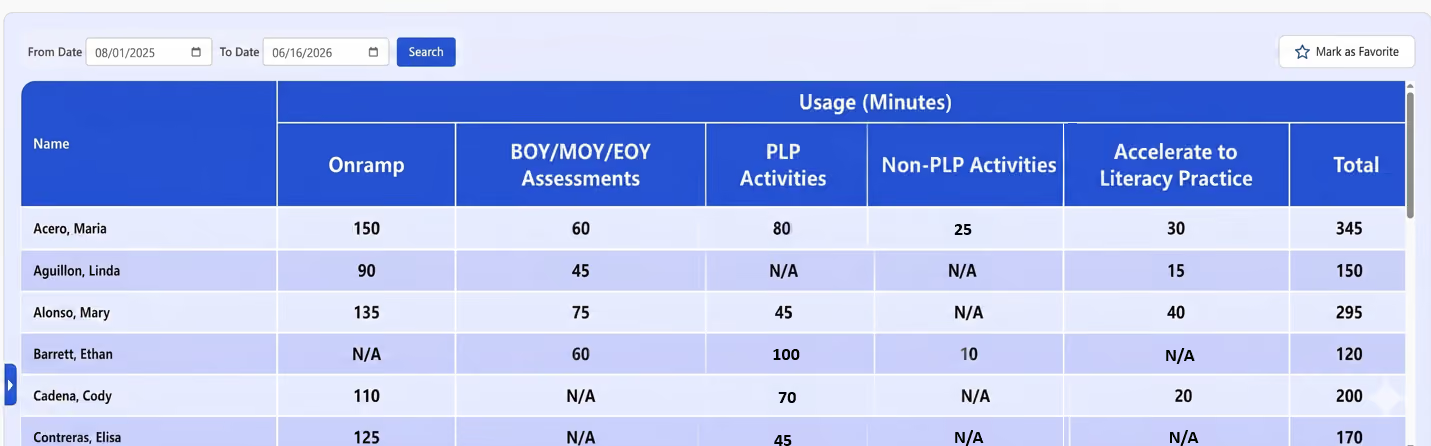
Overview
PLP pacing reports now track each student's progress against expected pace—and automatically adjust when your district calendar changes. Color-coded visuals make it easy to see at a glance who's on track, who needs support, and who's ready for more.
What You'll Love
- Expected pace recalculates automatically when edits are made to the available instructional days
- Color-coded pacing lines and bars to know if students are ahead of pace, on pace, or in need of additional support
- Spot off-pace students before gaps grow
- Class, campus and district-wide PLP pacing visibility at a glance
Overview
New Performance Indicator reports show how students are growing over time—not just where they are right now. Color gradients translate movement from starting scores into a visual story anyone can read, giving teachers and leaders a clearer view of momentum across students, classes, and grade bands.
What You'll Love
- Shows how far students have moved, not just where they are
- Red-to-green color gradients make growth immediately readable
- A clearer way to share student growth with families
- Growth patterns across classrooms guide coaching focus
Overview
Grouping reports now do more than sort students into clusters—they include suggested instructional strategies for each group. Based on partner feedback, these reports are designed to drive instruction, not just describe it, turning grouping into a built-in planning tool for small-group teaching.
What You'll Love
- Each group comes with suggested instructional strategies
- Faster small-group planning with a clear starting point
- Built-in strategy support for newer teachers and coaches
- More consistent differentiation across classrooms campus-wide
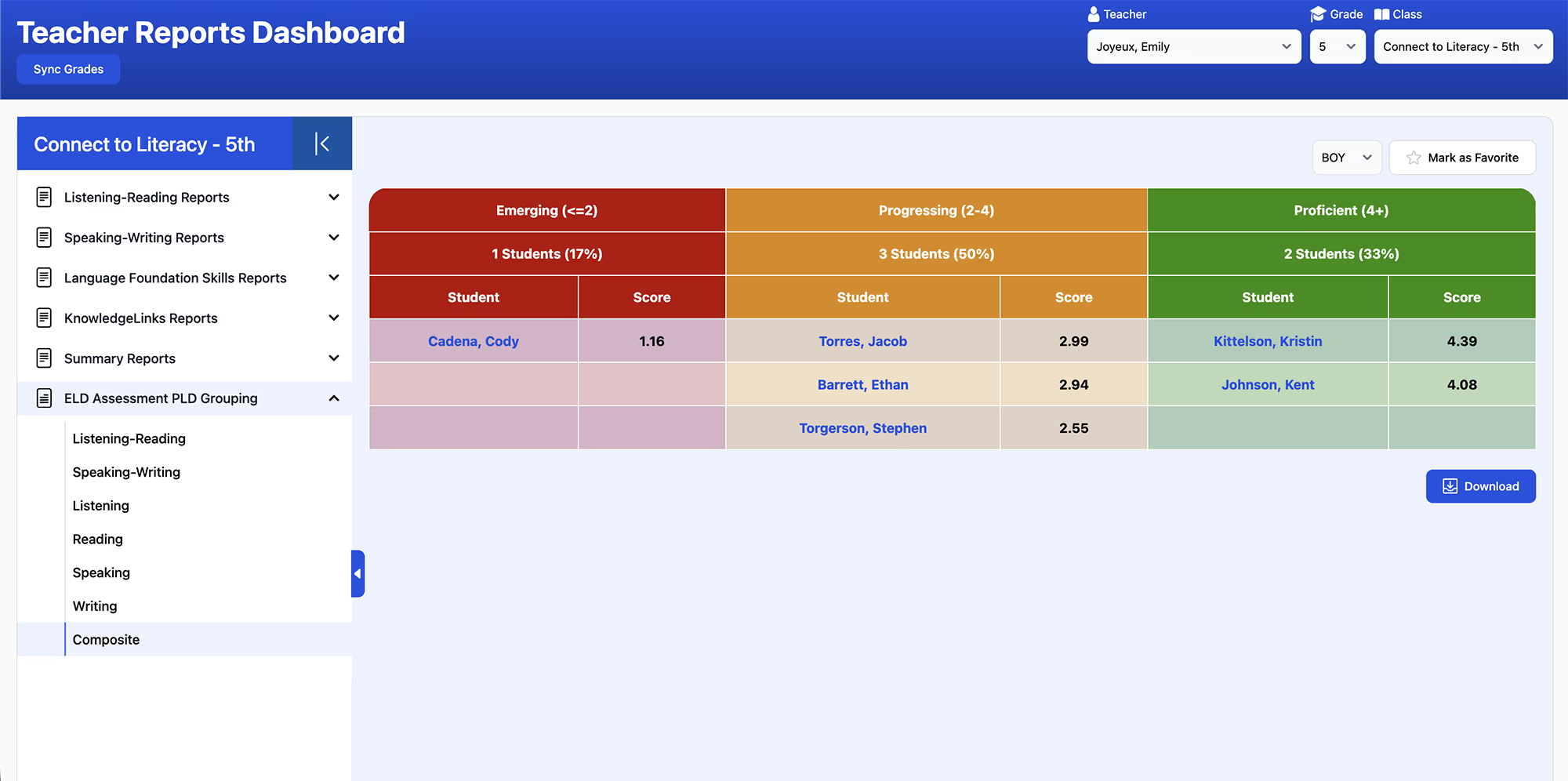
Overview
Administrator dashboards have been streamlined with a new one-stop Assessment and PLP report, color-coded progress bars, direct links to class-level data, and faster page loading—so campus and district leaders can see what's happening across their schools and get to the details that matter without the extra clicks.
What You'll Love
- A new one-stop shop Assessment and PLP report
- Richer grade-level insights to easily compare performance across different groups to spot trends faster.
- Our new full-screen view maximizes your screen real estate, allowing you to fit more report information on your screen for easier navigation and review.
- Color-coded PLP Progress bars to quickly show expected completion vs actual completion
- Direct links to class reports from the admin report dashboard
- Improved page loading speeds
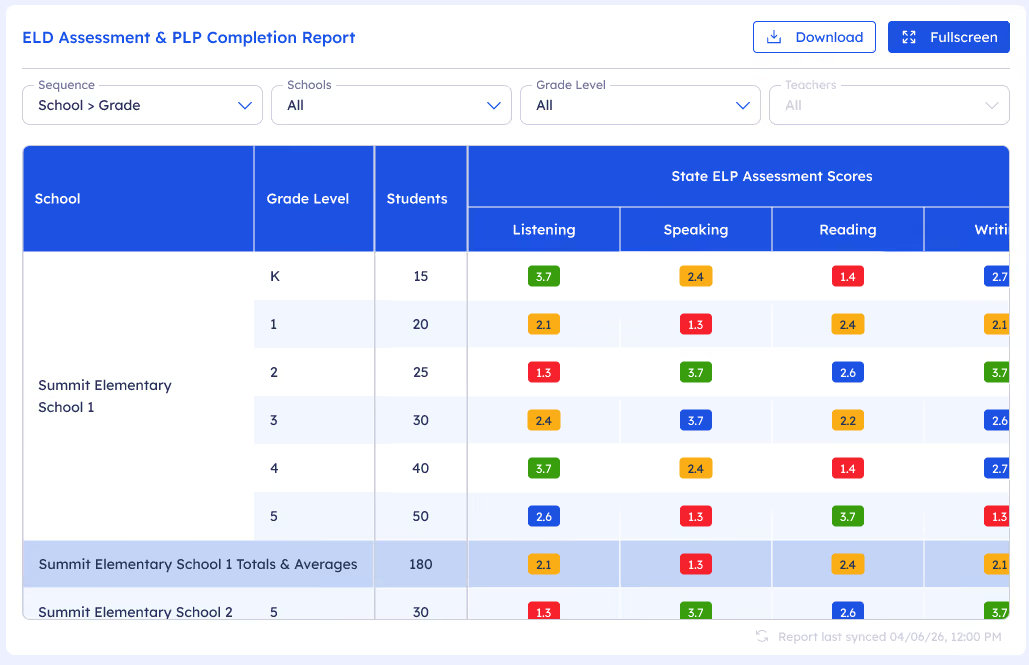

Overview
Summit K12 provides secure, automated daily C2L data exports of Student Utilization, PLP Completion, and Assessments through district-specific secure SFTP environments, enabling seamless integration of Summit K12 C2L platform data into district data warehouses, business intelligence platforms, and enterprise reporting systems.
These structured data feeds allow districts to combine Summit K12 C2L data with information from their Student Information System (SIS), assessment platforms, and other district data sources. This integrated approach enables districts to develop customized dashboards, reports, and analytics that provide deeper insights into student engagement, program utilization, academic progress, and instructional effectiveness.
By leveraging their own analytics platforms, districts maintain full control over reporting, data governance, and role-based access, ensuring that administrators, principals, teachers, and other stakeholders receive secure access to the information most relevant to their responsibilities.
What You'll Love
- Automated Daily Data Exports
- Seamless SIS & Data Warehouse Integration
- Custom District Dashboards & Reports
- Deeper Student Performance Insights
- Integrates with Existing Analytics Platforms
- District-Controlled Data Governance
- Secure Role-Based Data Access
- Empower Data-Informed Decision Making
Overview
District administrators involved in the onboarding and rostering process now have tools for streamlining the onboarding process. From easy access to SFTP credentials to managing district and school administrators to easy user uploads, more control is in the hands of districts than ever before.
What You'll Love
- New Summit K12 District Tech Admin Panel
- District Tech Admins are able to establish their rostering method, credentials, processing parameters, and schedule the frequency.
- New user CSV file upload tool for manual account creation
- SFTP credentials access for District Tech Admins
- District and school administrator accounts are saved year to year and only need to be updated based on staffing changes.
- Data Integration submission controls, statistics, error identification, abort, and process submission controls.
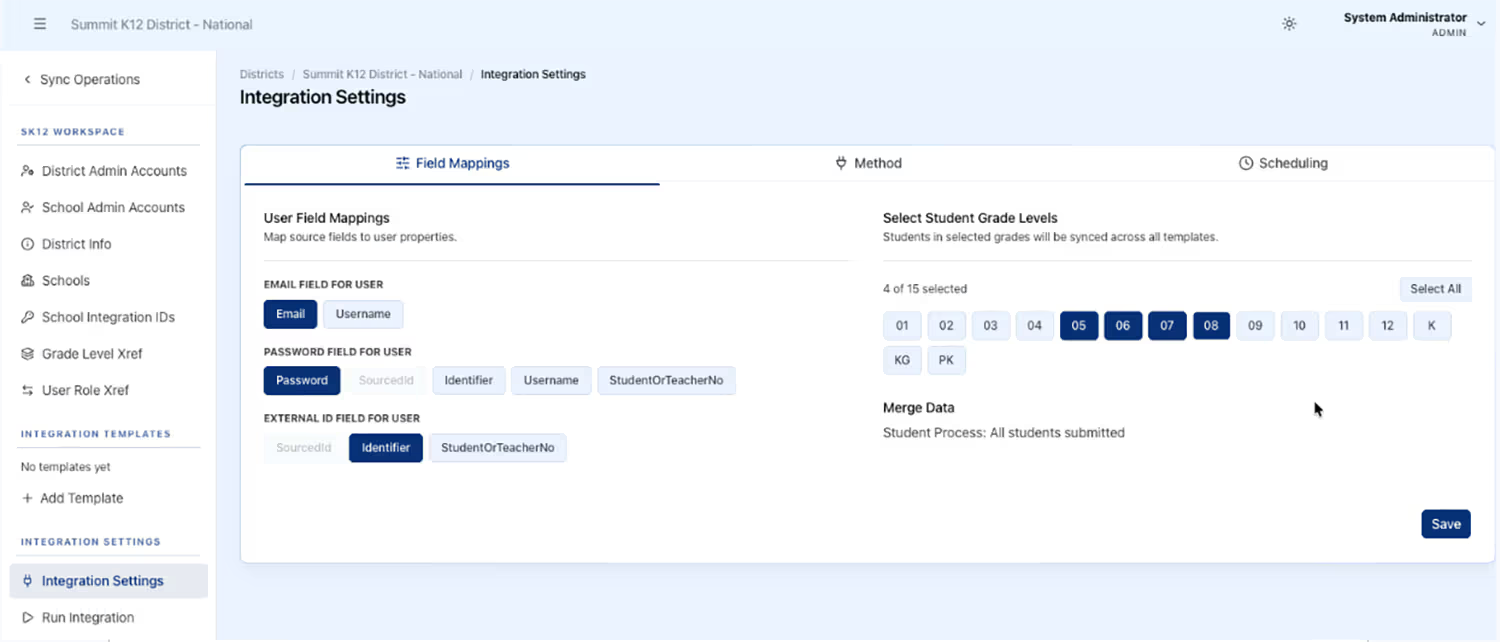
Student Engagement, UI/UX Updates
The student and teacher experience has been improved across the platform to support more focused learning, more efficient teaching, and a stronger sense of belonging for every student.
Overview
The student experience now puts learning front and center with a new center-stage activity view and an updated PLP activity completion view, making it easier for students to track their progress and see future lessons as they become available. In the new Essentials module, a streamlined, horizontal navigation helps students seamlessly move through lesson content and clearly see their progression through each topic. Students spend more time learning and less time figuring out where to click.
What You'll Love
- Current activity front and center the moment students log in
- Updated PLP activity completion view for easier progress tracking
- Horizontal navigation for smooth movement through Essentials lessons
- Less clicking, more time on task

Overview
Connect to Literacy now runs on a unified design system—consistent headers, reusable components, and the easier-to-read Lexend font across the entire platform. The tools teachers rely on most are easier to find and faster to use.
What You'll Love
- Consistent look and feel across every screen
- Teachers can assign content easily across class periods without switching to each class, saving time and reducing clicks
- New staff can find what they need without relearning each section
- Familiar patterns let teachers focus on students, not the interface

Overview
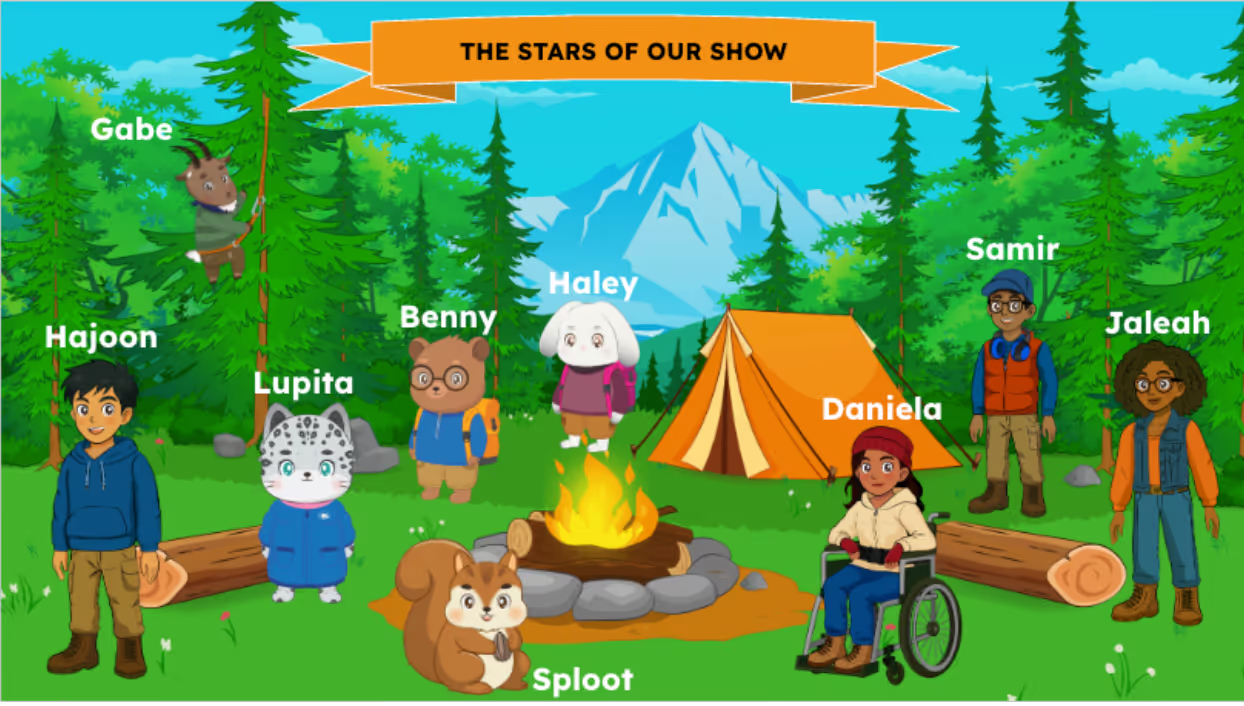
Students now meet a wider, more inclusive cast of characters and avatars across Connect to Literacy, the new K–1 Trailblazers experience, and the new Essentials pathway for newcomers. In Trailblazers, Benny the Bear leads the way, and students earn avatar accessories as they progress—building a sense of identity and belonging from the start. In Essentials, age-appropriate characters for grades 2–5, 6–8, and 9–12 help newcomers feel welcomed and represented as they build the real-world communication skills they need to settle into school.
What You'll Love
- Guided by Benny - mascot led navigation through lessons
- Students earn avatar accessories as they progress
- More inclusive cast so every student sees themselves
- Visual identity and fun woven throughout the experience

Overview
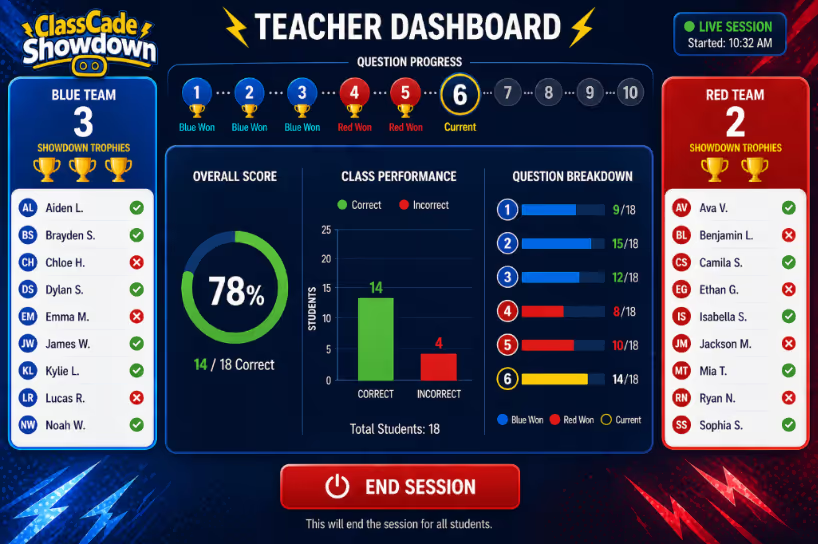
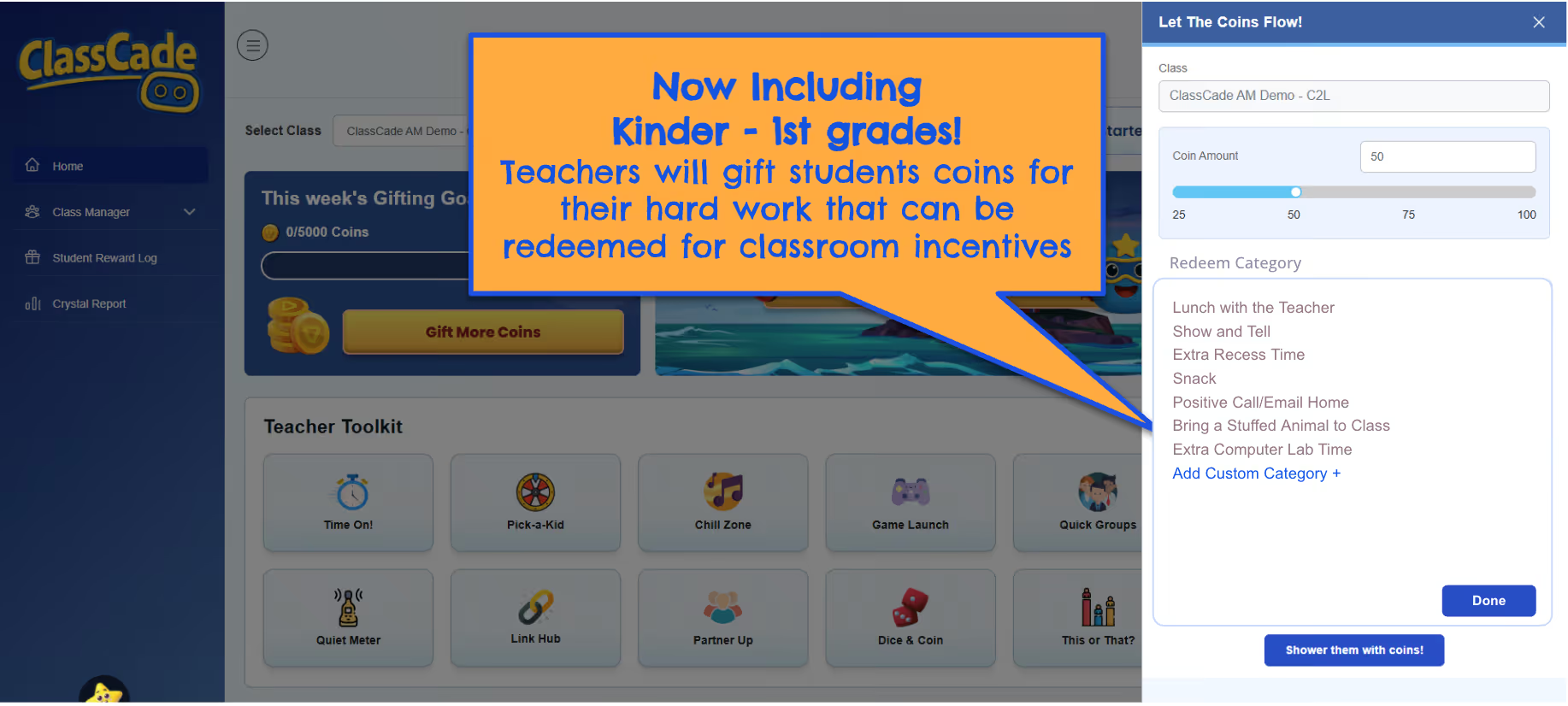
ClassCade and PBIS Rewards now recognize first-attempt success and connect daily effort inside Connect to Literacy to schoolwide reward systems. Celebrating both growth and positive behavior in one place supports the academic and culture-building goals districts already have in motion.
What You'll Love
- ClassCade Points celebrate student content learning and mastery success
- PBIS rewards tied directly to daily work inside Summit
- Built-in recognition supports culture-building without extra effort
- Students, teachers, and families see wins in real time
- Now includes support for students in K-12 to redeem coins for classroom incentives designated by teachers

Major ELPA21 Updates
Overview
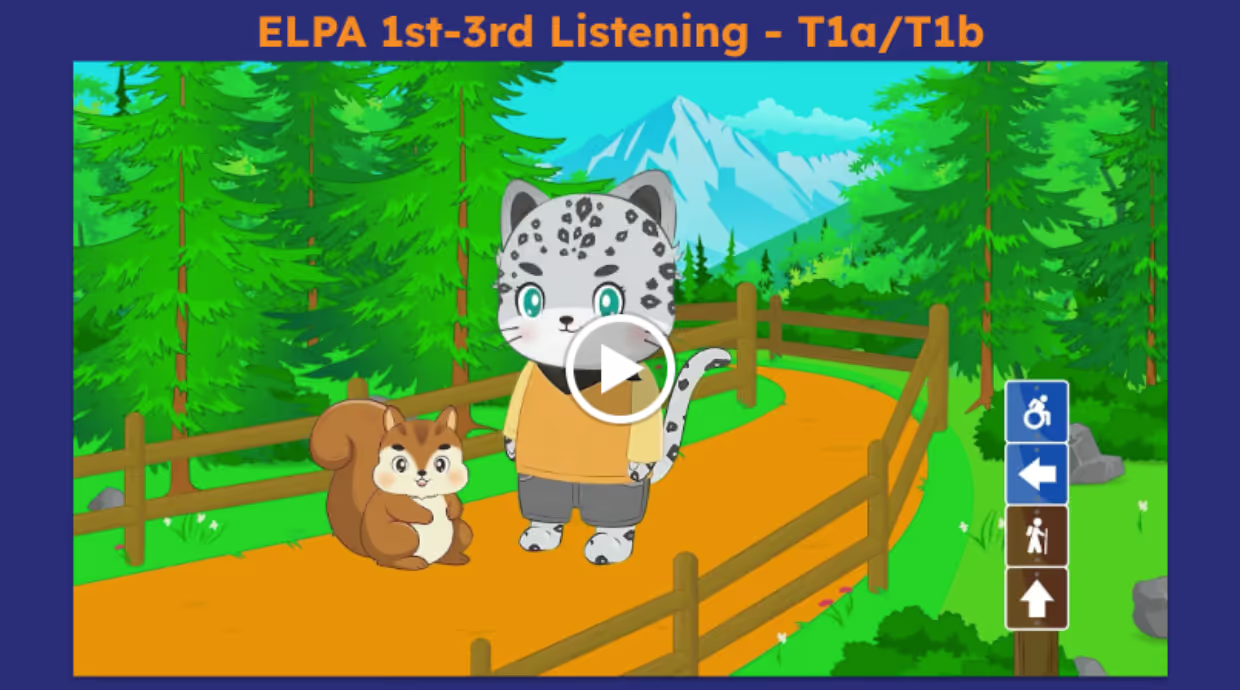
New Lesson Model Videos have been embedded for each readiness task type across Listening, Speaking, Reading, and Writing—aligned by grade band. Written and designed by the curriculum team, each video models task expectations, explains success criteria, and shows students how to approach each activity, reducing confusion and building confidence before they begin.
What You'll Love
- Videos for every readiness task type across all four language domains
- Aligned by grade band for age-appropriate modeling
- Shows students what success looks like before they start
- Reduces confusion and builds confidence with each activity type
Overview
A2L Smarter Balanced is a new product for grades 3–8 and 11 for States that use the Smarter Balanced Assessment.
The new intensive readiness add-on brings together a screener, personalized instructional pathways, and a standards-aligned item bank—all built around the Smarter Balanced ELA blueprints. Every component includes embedded language support so multilingual learners can access grade-level content while building the skills they need for state assessments and reclassification.
What You'll Love
- Screener modeled after SBAC ELA blueprints with embedded language support
- Personalized pathways across Reading, Writing, Listening, and Research/Inquiry
- Grade-level rigor with built-in scaffolds for language learners
- Flexible item bank for custom, standards-aligned assignments
- Connects language development and ELA test readiness in one experience


